Why Effective Cooling Matters for High-Performance Laptops Like Acer Swift 16
Acer’s Swift 16 AI doesn’t just run the latest Panther Lake architecture—it keeps its cool even when pushed to the edge. That’s a rare feat in the world of ultra-slim laptops, where thermal constraints often blunt the real-world impact of new silicon. Overheating is the enemy of sustained performance. When heat builds up, CPUs and GPUs dial back their clocks to avoid damage, cutting speed and responsiveness just when you need them most. User comfort takes a hit, too: a hot chassis isn’t just unpleasant, it signals that the system is fighting to keep up.
In this context, cooling isn’t an afterthought—it’s a core enabler of what Panther Lake can actually deliver. According to Notebookcheck, the Swift 16 AI relies on a robust cooling solution to maintain stable performance, even under extreme loads. That’s not marketing fluff; it’s essential hardware engineering that dictates whether the laptop’s next-gen internals can run full tilt or get throttled into mediocrity.
What Makes the Acer Swift 16’s Cooling System Stand Out Compared to Competitors
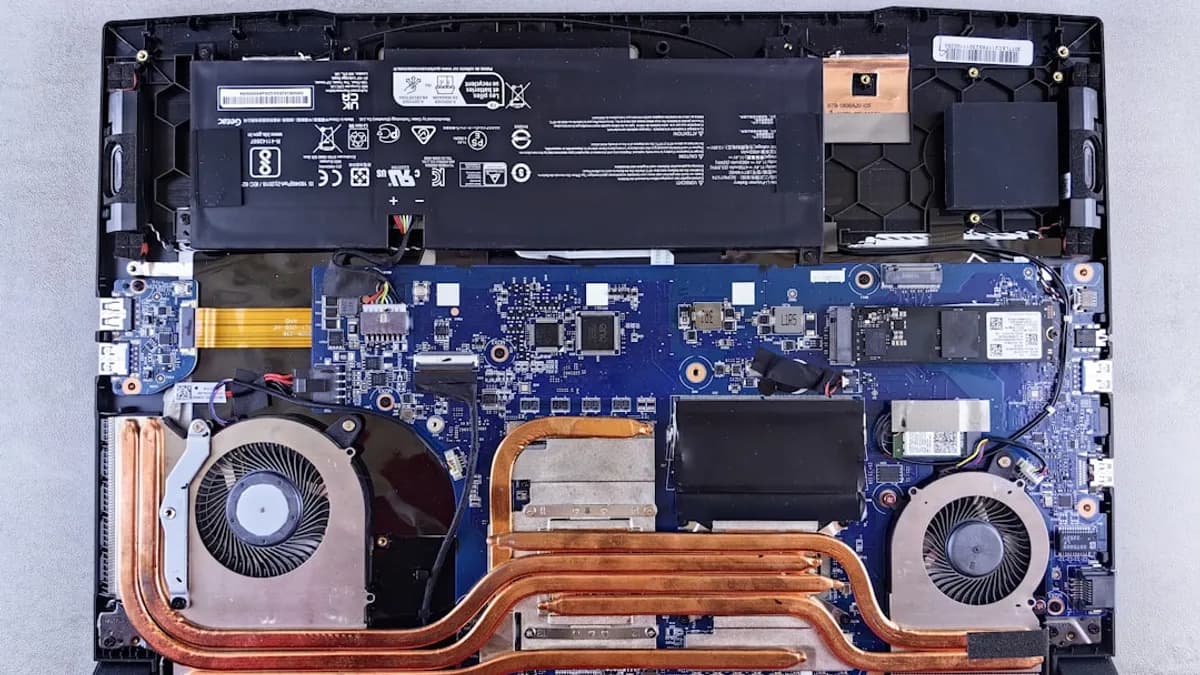
Pop the hood on the Swift 16 AI and you’ll find a cooling system that goes beyond the bare minimum. The chassis houses a combination of multiple fans and strategically placed airflow channels, specifically tuned for the Panther Lake platform. This isn’t the default single-fan, heat-pipe arrangement seen in most thin-and-light notebooks. Instead, Acer’s thermal design actively manages airflow throughout the chassis, pushing hot air out before it can pool around heat-sensitive components.
Notebookcheck’s teardown and thermal imaging show that this approach pays off. The fans and ducts are aligned to pull in cool air from the bottom and exhaust it efficiently out the sides or rear. This keeps the motherboard, CPU, and other key parts from becoming local hot spots—a common failure point in slimmer competitors, where heat often radiates into the palm rest or display hinge. While the source doesn’t cite specific temperature numbers, the focus on “remarkably cool” chassis surfaces under heavy load suggests Acer has tuned the system for user comfort as well as silicon longevity.
How Acer Swift 16’s Cooling Technology Maintains Stable Performance Under Stress
When workloads spike, the Swift 16’s cooling setup shifts into high gear. Under extreme stress tests—situations designed to max out CPU and GPU usage—Notebookcheck’s thermal images show that the system keeps internal and external temperatures in check. This thermal stability is what lets the Panther Lake architecture maintain its rated speeds instead of throttling down. The practical result: performance remains consistent, even during sustained compute bursts, rather than sagging after a few minutes of heat buildup.
Unlike laptops that only perform well in short benchmarks, the Swift 16’s cooling solution is built for endurance. The fans and airflow channels don’t just keep the processor cool; they prevent heat from seeping into areas that affect the user directly, like the keyboard deck or palm rests. That attention to detail keeps the experience comfortable during prolonged sessions—a distinction that matters for anyone relying on the Swift 16 for demanding applications.
What Users Can Expect: Real-World Benefits of Acer Swift 16’s Cooling System
In practical terms, users get a laptop that stays cool to the touch, even when pushed to its limits. Notebookcheck’s hands-on thermal data reveals that the chassis surface avoids hotspots in both idle and high-load scenarios. That means no more scorched wrists after an afternoon of heavy multitasking. The cooling system’s effectiveness also suggests that internal components are less likely to suffer from heat-related wear, potentially extending the device’s useful life.
The real-world benefit is clear: you get stable performance, reliable hardware, and a more pleasant user experience. While the source doesn’t quantify acoustic output, the emphasis on airflow management implies fan noise is kept in check by design, since better airflow can reduce the need for fans to run at full tilt. This approach to thermal management is similar to innovations seen in other leading laptops, such as the Lenovo Grabs Lead with Intel Core Ultra X9 378H Laptop, which also balances performance and cooling in a slim design.
How Acer’s Cooling Innovations Reflect Broader Trends in Laptop Thermal Management
The Swift 16’s cooling design is a data point in a larger shift: as processors like Panther Lake get more powerful, effective thermal management becomes non-negotiable. Acer’s approach—combining multiple fans with intelligent airflow routing—shows how manufacturers are rethinking the inside of the chassis, not just the specs on the box.
As the industry races to deliver thinner, lighter, and more powerful AI-enabled laptops, the battle will be fought as much in thermal engineering as in raw silicon. The Swift 16 hints at what’s next: smarter airflow, precision fan control, and a relentless focus on keeping both performance and user comfort at the forefront. These trends echo developments in mobile operating systems as well, with updates like iOS 27 Lets You Fully Customize Your iPhone Camera App enhancing device control and user experience on another front.
What We Know, What Remains Unclear, and What to Watch
What’s clear from Notebookcheck’s review is that the Swift 16’s cooling system is tuned for sustained performance and a cool chassis—even when stressed. The combination of fans and airflow management sets it apart from typical thin-and-light laptops.
What remains unclear: the review doesn’t provide specific temperature readings, noise measurements, or direct head-to-head comparisons with rival systems. We also don’t know how the cooling holds up over years of dust accumulation or in varied real-world environments.
What to watch: Future reviews should test not just peak performance, but long-term thermal stability and acoustic comfort. As AI workloads grow and chips get even hungrier, Acer’s cooling design could become a blueprint—or a baseline that others will need to beat. For now, the Swift 16 AI stands out as a laptop that lets its next-gen hardware actually stretch its legs, without burning yours in the process.
Why It Matters
- Effective cooling allows the Acer Swift 16 to consistently deliver peak performance even during intense workloads.
- Advanced thermal design improves user comfort by preventing the laptop chassis from getting uncomfortably hot.
- Superior cooling technology sets a new standard for what users can expect from ultra-slim, high-performance laptops.