As a creator in 2026, mastering social media scheduling and automation is no longer optional—it's essential for growth, consistency, and sanity. With ever-increasing platform demands and the need to engage audiences across multiple channels, a robust social media scheduling automation guide can transform your workflow. This tutorial will walk you through the most effective strategies, tools, and best practices—grounded entirely in the latest research and real product data—to help you streamline your content calendar, automate routine tasks, and maximize your engagement as a creator today.
Why Scheduling and Automation Matter for Creators
Social media has evolved into a multi-platform, always-on environment where creators are expected to produce, engage, and analyze simultaneously. Manual posting and engagement quickly become unsustainable, especially as you scale.
"Effective social media marketing is more than just posting great content regularly. It requires closely monitoring your messages and providing timely responses. This aspect...can be grueling and time-consuming. That’s where social media automation tools come in."
— Sprout Social, 2026
Key reasons to embrace scheduling and automation:
- Consistency: Maintain a regular posting cadence without daily manual effort
- Efficiency: Batch-create and schedule content, freeing time for strategy and creative work
- Cross-platform reach: Manage multiple accounts from a single dashboard
- Reduced burnout: Eliminate the need for real-time posting and last-minute scrambles
- Data-driven decisions: Use analytics to refine what, when, and how you post
Popular Scheduling Tools and Their Features
Choosing the right social media scheduling tool depends on your needs, platform mix, and budget. Below is a comparison of the most referenced tools in 2026, drawn from authoritative industry sources.
| Tool | Best For | Starting Price | Free Plan | Content Calendar | Bulk Scheduling | Team Features | Analytics Depth |
|---|---|---|---|---|---|---|---|
| Hootsuite | Large teams, enterprises | $99/mo | No | Yes | Yes | Advanced | Advanced |
| Sprout Social | Enterprises, agencies | $199/mo per seat | No | Yes | Yes | Advanced | Advanced |
| Buffer | Creators, small teams | $5/mo per channel | Yes | Yes | Yes | Limited | Basic |
| Later | Small teams, visual planning | $25/mo | Yes | Yes | Yes | Moderate | Moderate |
| Canva | Design-led teams | Not specified | Yes | Yes | Yes | Yes | Basic |
| MeetEdgar | Freelancers, entrepreneurs | Not specified | No | Yes | Yes | Limited | Basic |
Key features to look for:
- Visual Content Calendars: Drag-and-drop scheduling and rescheduling
- Bulk Upload: Schedule weeks or months of posts in minutes
- Unified Inbox: Manage DMs and comments across all platforms
- Approval Workflows: Team-based draft/review/publish cycles
- AI Assistance: Caption creation and performance-based recommendations
- Analytics: Track reach, engagement, and growth metrics
"Look for a visual content calendar, bulk scheduling capabilities, a unified social inbox, and robust analytics."
— Buffer, 2026
Setting Up a Content Calendar for Consistent Posting
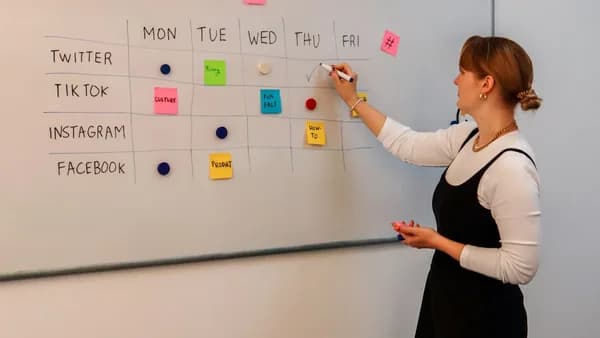
A content calendar is the backbone of a consistent and effective social media strategy. Leading scheduling tools provide visual calendars to plan, preview, and manage your posts.
Steps to Build a Content Calendar
- Choose a tool with a calendar feature (e.g., Hootsuite, Buffer, Later).
- Batch-create content: Set aside blocks of time to produce multiple posts at once.
- Map posts to dates/times using drag-and-drop calendars.
- Preview and adjust: Visual planners (e.g., Later's Instagram grid preview) let you see your feed before publishing.
- Incorporate themes and campaigns: Plan around launches, holidays, or trends.
Tip:
Many tools offer free social media calendar templates to get you started. For instance, Hootsuite provides downloadable templates, and Buffer has a collection of 13 free calendar templates.
Automating Posts Across Multiple Platforms
Modern creators rarely focus on just one social network. True automation means managing diverse channels from a single dashboard, each with its own optimal formats and posting times.
Supported Platforms by Major Tools
| Tool | Supported Platforms |
|---|---|
| Hootsuite | Facebook, Instagram, X (Twitter), TikTok, YouTube, Pinterest, LinkedIn, Threads |
| Sprout Social | Facebook, Instagram, X, WhatsApp (for chatbots), LinkedIn, Pinterest, YouTube, TikTok |
| Later | Facebook, Instagram, X, TikTok, YouTube, Pinterest, LinkedIn |
| Buffer | Facebook, Instagram, X, TikTok, YouTube, LinkedIn, Threads, Mastodon |
| MeetEdgar | Facebook, Instagram, X, TikTok, Pinterest, LinkedIn, Threads |
Automation Features:
- Auto-posting: Schedule once, publish everywhere
- Bulk Scheduling: Upload posts via CSV or folders for batch publishing
- Customizable Crossposting: Tailor a single post for each platform
- Smart Queues: Maintain a steady content flow even on busy days
"Tools...let you create and schedule content for automatic publication at the optimal time. They save time and help you stay consistent with your social media strategy."
— Hootsuite, 2026
Best Practices for Timing and Frequency
The best time to post is when your audience is most active. Modern scheduling tools analyze engagement patterns and recommend optimal posting times.
How Tools Help with Timing
- Best-time-to-post suggestions: Hootsuite and Sprout Social offer custom recommendations based on your analytics.
- AI-driven Scheduling: Buffer and Sprout Social use AI to maximize reach.
Best Practices:
- Use tool recommendations: Base timing on analytics rather than guesswork.
- Maintain consistency: Regular posting outperforms sporadic bursts.
- Batch scheduling: Dedicate a day each week to schedule all upcoming posts.
"Many social media automation tools even come with analytics features that suggest the best times to post on social media. This saves you the extra step..."
— Sprout Social, 2026
Using Automation to Engage with Followers
Automation isn’t just for posting—it can also streamline follower engagement and customer care.
Engagement Automation Features
- Unified Inbox: Reply to all DMs, comments, and mentions from one dashboard (Hootsuite, Sprout Social, Buffer)
- Automated Responses: Set up canned replies for common questions
- Chatbots: Sprout Social offers a Bot Builder to automate customer support on X, Facebook, Instagram DMs, and WhatsApp
- Social CRM: Build customer profiles and view conversation history for personalized responses (Sprout Social)
"Get messages from all your social media networks in a Smart Inbox and reply from one platform. You can delegate these messages to specific team members and automate canned responses."
— Sprout Social, 2026
Avoiding Common Automation Pitfalls
Automation is powerful, but misuse can backfire. Here are critical pitfalls to avoid:
- Robotic Responses: Overuse of canned replies or generic chatbots can alienate followers.
- Ignoring Platform Nuance: Automated crossposting that doesn't adjust for platform-specific formats (e.g., hashtags, image sizes) can hurt engagement.
- Scheduling and Forgetting: Set-it-and-forget-it posting risks missing real-time trends or audience interactions.
- Approval Lapses: Without workflows, unsupervised automation can lead to mistakes or off-brand posts.
- Analytics Neglect: Failing to review automated posts' performance limits growth.
"Reduce the risk of mistakes: Set custom permissions and approval workflows and allow time for reviewing content before it goes live."
— Hootsuite, 2026
Measuring the Impact of Scheduled Content
Tracking performance is vital to refining your strategy. Leading tools provide built-in analytics dashboards for:
- Reach and Impressions
- Engagement Rates (likes, comments, shares)
- Click-throughs and Conversions
- Audience Growth
Example: Buffer Analytics Features
- Basic Analytics: Track post performance by platform
- Engagement Metrics: Visualize which content drives the most interaction
- Growth Reports: See follower changes over time
For deeper analysis (e.g., campaign ROI, audience demographics), enterprise tools like Hootsuite and Sprout Social offer advanced reporting and custom dashboards.
Integrating Scheduling with Analytics Tools
Combining scheduling with analytics enables a feedback loop—schedule, analyze, refine, repeat.
Integration Examples
- Sprout Social: Custom reports and graphics of your growth; integrates with Salesforce, Zendesk, and Hubspot for end-to-end customer experience tracking.
- Hootsuite: Tracks key metrics in one dashboard; integrates with 100+ apps such as Canva and Notion.
- Unified Reporting: Many tools allow exporting data for deeper analysis or sharing with clients/teams.
Pro Tip:
Choose a tool that combines scheduling and analytics for a seamless workflow and data-driven decision-making.
Advanced Tips for Scaling Your Social Media Presence
Once your foundations are set, these advanced strategies can accelerate your growth:
- Leverage AI for Content Creation: Hootsuite’s OwlyWriter AI and Sprout Social’s AI assistants can generate engaging captions and hashtag suggestions.
- Bulk Schedule Campaigns: Use CSV imports or folder-based uploads to schedule entire campaigns in minutes (supported by Buffer, Hootsuite, Sprout Social).
- Set Up Approval Workflows: For teams, use draft → review → publish cycles to maintain quality and brand safety.
- Visualize Your Feed: Use tools like Later to preview Instagram and other visual platforms before posts go live.
- Monitor and Manage Reviews: Tools like Sprout Social aggregate review notifications from Google, Yelp, and Facebook, helping you protect your brand reputation.
- Automate Multi-step Engagement: Advanced chatbots (Sprout Social) can handle FAQs, escalate issues, or route messages to team members automatically.
FAQ
Q: What is the best social media scheduling tool for solo creators?
A: According to Buffer, Buffer is well-suited for creators and small teams due to its $5/month per channel pricing, free plan, and core features like content calendar, bulk scheduling, and basic analytics.
Q: Can I schedule posts for multiple platforms at once?
A: Yes. Tools like Hootsuite, Sprout Social, Buffer, and Later all allow scheduling and publishing across platforms including Facebook, Instagram, X, TikTok, YouTube, Pinterest, LinkedIn, and Threads.
Q: How do I know the best time to post?
A: Most leading tools offer best-time-to-post analytics based on your audience’s activity. For example, Hootsuite and Sprout Social provide custom recommendations using your own performance data.
Q: Are there free social media scheduling tools?
A: Buffer and Metricool offer free plans, while Later also has a free tier with limited functionality.
Q: What features should I prioritize when choosing a scheduler?
A: Prioritize a visual content calendar, bulk scheduling, unified inbox, analytics, and (for teams) approval workflows.
Q: How can I automate engagement without sounding robotic?
A: Use canned responses and chatbots for FAQs, but monitor interactions and personalize replies where possible. Tools like Sprout Social’s Bot Builder allow for more nuanced automation.
Bottom Line
The right approach to social media scheduling and automation can transform your creator workflow in 2026. Tools like Hootsuite, Sprout Social, Buffer, and Later enable you to plan, automate, and optimize content across platforms—reducing manual effort, improving consistency, and maximizing engagement.
"Scheduling is not just a tactical advantage—it’s how modern creators stay visible, reduce burnout, and keep growing."
— Buffer, 2026
By grounding your strategy in analytics, leveraging AI and automation features, and following the best practices outlined in this guide, you’ll be better positioned to scale your social media presence and achieve your goals as a creator. Choose your tools wisely, monitor your results, and keep refining your approach for ongoing success.