Updated (June 2026): Refreshed platform support, tool recommendations, pricing caveats, and workflow guidance to reflect newer social networks, AI-assisted planning, and current creator needs.
Efficiently managing and scheduling content across multiple social media platforms is now a core skill for creators who want growth, consistency, and less burnout. Audiences are spread across Instagram, TikTok, YouTube, LinkedIn, X, Threads, Pinterest, Facebook, and emerging networks, so publishing manually everywhere is rarely sustainable.
This guide explains how creators can schedule content across platforms, choose the right tools, avoid common mistakes, and build a repeatable workflow that supports both creativity and performance.
Why Scheduling Content Matters for Creators
For creators, multi-platform publishing can quickly become overwhelming. Scheduling content on multiple social media platforms is more than a convenience—it is part of a professional content operation.
- Efficiency: Scheduling tools reduce repetitive publishing tasks so creators can spend more time producing, editing, and engaging.
- Consistency: A planned calendar helps maintain a steady presence without daily last-minute posting.
- Better strategy: Scheduling forces creators to think in campaigns, themes, launches, and audience journeys instead of isolated posts.
- Performance tracking: Centralized tools make it easier to compare what works across channels.
- Collaboration: For creators with editors, managers, assistants, or brand partners, approval workflows reduce mistakes and keep content aligned.
The goal is not to automate your personality out of social media. It is to automate the repetitive parts so you can show up more intentionally.
Overview of Popular Social Media Platforms and Their Scheduling Features
Native scheduling has improved, but it still varies by platform. Many creators use a mix of native tools and third-party schedulers depending on the channel.
| Platform | Native Scheduling? | Supported by Major Schedulers | Unique Considerations |
|---|---|---|---|
| Yes | Yes | Strong native tools via Meta Business Suite | |
| Yes | Yes | Reels, Stories, carousels, and grid planning matter | |
| X | Limited | Yes, varies by tool/API access | API changes can affect third-party features |
| TikTok | Yes, limited | Yes | Video-first; desktop and business features vary |
| Yes | Yes | Strong for B2B creators, newsletters, and thought leadership | |
| Yes | Yes | Best for evergreen, visual, search-driven content | |
| YouTube | Yes | Yes | Long-form videos, Shorts, premieres, and community posts |
| Threads | Limited/evolving | Increasingly supported | Third-party publishing has expanded but features vary |
| Bluesky | Limited/evolving | Supported by some tools | Emerging network; scheduler support is still inconsistent |
| Limited | Limited | Community rules and real-time participation matter most |
Key Insights:
- Native schedulers are useful if you focus on one or two platforms.
- Third-party tools are better when you need cross-platform calendars, approvals, analytics, and bulk scheduling.
- Instagram, TikTok, YouTube Shorts, and Pinterest benefit from visual planning because format and presentation strongly influence performance.
- Newer platforms like Threads and Bluesky are increasingly supported, but features may lag behind established networks.
Choosing the Right Scheduling Tool for Your Needs
The best tool depends on your platforms, budget, team size, and need for analytics or approvals. Pricing changes frequently, so confirm current plans before committing.
| Tool | Best For | Supported Platforms | Key Features | Starting Price |
|---|---|---|---|---|
| Hootsuite | Teams and businesses | Facebook, Instagram, X, LinkedIn, TikTok, YouTube, Pinterest, Threads and more | Calendar, analytics, inbox, approvals, AI assistance | Paid plans; typically higher-cost |
| Sprout Social | Brands and growing teams | Major social platforms | Deep analytics, inbox, reporting, collaboration | Premium pricing |
| Buffer | Solo creators and small teams | Major platforms, with support varying by plan | Simple scheduling, calendar, basic analytics | Free/low-cost options available |
| Later | Visual creators and ecommerce | Instagram, TikTok, Pinterest, Facebook, LinkedIn, X, YouTube and more | Visual planner, link-in-bio, media library | Entry-level paid plans |
| Metricool | Creators needing analytics | Major platforms plus ads/reporting features | Scheduling, competitor tracking, reporting | Free and paid plans |
| Planable | Agencies and approval-heavy teams | Major platforms | Collaboration, reviews, approvals, content previews | Paid plans |
| Sendible | Agencies and service providers | Major platforms | Client management, scheduling, reporting | Paid plans |
Critical Features to Consider
- Platform coverage: Make sure the tool supports every channel you actually use.
- Content calendar: A visual calendar helps plan campaigns and avoid posting gaps.
- Post customization: You should be able to adjust captions, hashtags, links, and media per platform.
- Analytics: Look for reach, engagement, clicks, audience growth, and best-time-to-post insights.
- Approval workflows: Essential if anyone reviews content before publishing.
- AI assistance: Useful for caption drafts, repurposing, hashtag ideas, and timing recommendations—but still needs human review.
- Unified inbox: Helpful for managing comments, DMs, and mentions from one place.
Step-by-Step Setup for Multi-Platform Scheduling
1. Audit Your Social Media Accounts
List every platform, profile, owner, login method, and posting goal. Note which channels are priorities and which are secondary.
2. Choose and Set Up Your Scheduler
Pick a tool that supports your platforms and workflow. Connect accounts securely, confirm permissions, and check whether any features require business or creator account settings.
3. Build Your Content Library
Organize images, videos, thumbnails, captions, hooks, hashtags, links, and brand assets. Use folders or tags for campaigns, content pillars, and platforms.
4. Plan Your Content Calendar
Map out launches, sponsorships, holidays, recurring series, and evergreen content. A good calendar should show what is posting, where it is posting, and why.
5. Customize and Schedule Posts
Avoid copying the exact same post everywhere. Adjust:
- Caption length
- Hashtag strategy
- Video format and aspect ratio
- Thumbnail or cover image
- Link placement
- Call to action
6. Collaborate and Approve
If you work with a team, create clear review stages. For example: draft, edit, brand review, approved, scheduled, published.
7. Monitor and Adjust
Check for failed posts, formatting issues, broken links, and time-sensitive updates. Scheduling is not “set and forget”—it requires active oversight.
Best Practices for Timing and Frequency of Posts
There is no universal best posting time. The best schedule depends on your niche, audience location, platform, and content type.
- Use platform analytics first: Your own audience data is more valuable than generic benchmarks.
- Test posting windows: Compare morning, midday, evening, and weekend performance.
- Prioritize consistency over volume: A sustainable schedule beats an aggressive one you abandon.
- Match platform behavior:
- Instagram: Feed posts, Reels, Stories, and carousels can each serve different goals.
- TikTok: Consistency and strong hooks matter more than perfect polish.
- YouTube: Long-form and Shorts may need separate calendars.
- LinkedIn: Thought leadership, industry commentary, and professional storytelling perform well.
- Pinterest: Evergreen content and search-friendly descriptions are important.
- X and Threads: Real-time conversation still matters, so supplement scheduled posts with live engagement.
AI-based timing recommendations can be useful, but they should be treated as a starting point, not a rule.
Automating Engagement and Monitoring Performance
Automation should support engagement, not replace it.
Engagement Automation
- Unified inboxes help manage comments, mentions, and direct messages.
- Saved replies can speed up common responses.
- Routing and labels are helpful for teams handling brand deals, customer questions, or community moderation.
Avoid overusing auto-replies. Audiences can quickly tell when responses feel robotic.
Performance Monitoring
Track both platform-specific and cross-platform metrics:
- Reach and impressions
- Engagement rate
- Saves, shares, and comments
- Link clicks
- Watch time and retention
- Follower growth
- Conversion or sales impact
The most useful reports show patterns: which topics, formats, hooks, and posting times reliably move your goals forward.
Avoiding Common Scheduling Pitfalls
- Over-automation: Scheduled posts should not replace real-time interaction.
- Platform mismatch: A LinkedIn post should not read exactly like a TikTok caption.
- Ignoring current events: Pause or adjust scheduled content when major news makes a post feel tone-deaf.
- Broken links or wrong tags: Always preview posts before they go live.
- No approval process: Even solo creators benefit from a final review checklist.
- Chasing every platform: Focus on the platforms that match your audience and content strengths.
Integrating Scheduling with Content Calendars
A content calendar is the backbone of a strong scheduling workflow.
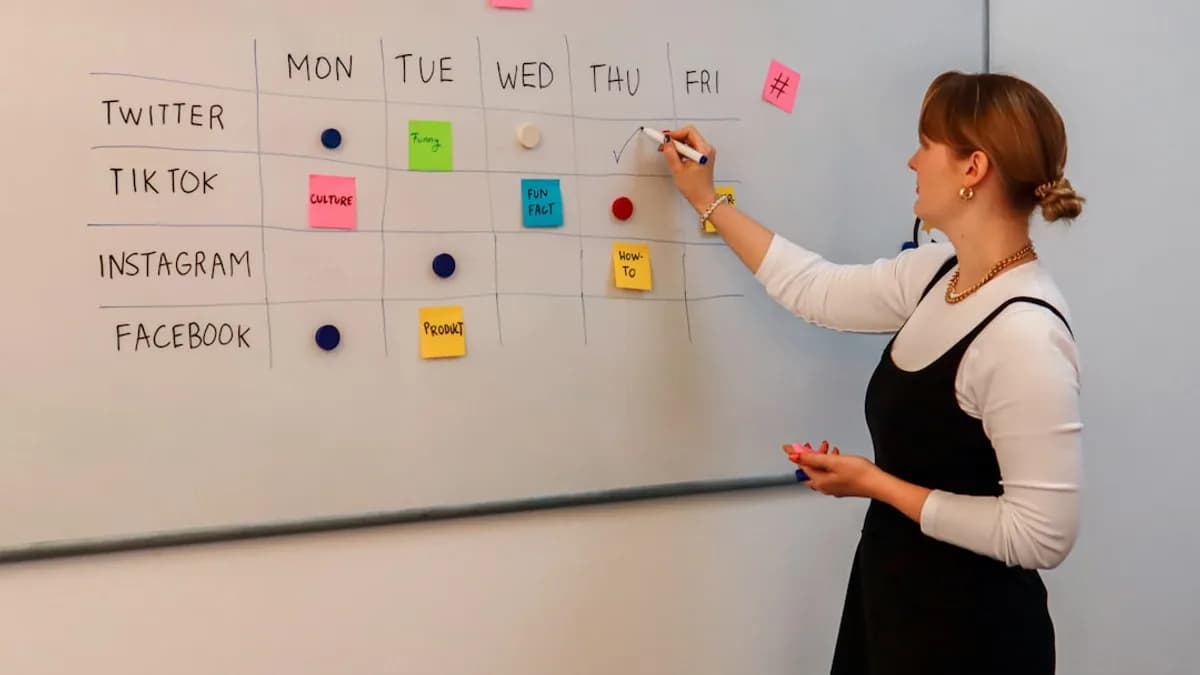
- Visual planning: See posts by day, platform, campaign, and format.
- Campaign coordination: Align social posts with product launches, newsletters, podcasts, videos, and brand partnerships.
- Content repurposing: Turn one idea into multiple platform-native assets.
- Status tracking: Use labels such as idea, drafted, edited, approved, scheduled, and published.
A simple calendar can start in Notion, Airtable, Google Sheets, or Trello. As your workflow grows, a dedicated scheduler can reduce manual coordination.
Analyzing Results to Refine Your Posting Strategy
Scheduling only works if you review the results.
- Compare platforms: A topic may perform well on LinkedIn but poorly on TikTok, or vice versa.
- Review content formats: Track Reels vs. carousels, Shorts vs. long-form, text posts vs. image posts.
- Measure outcomes, not just likes: Saves, shares, email signups, sales, and community growth often matter more.
- Update your calendar: Double down on proven themes and retire formats that consistently underperform.
- Run monthly reviews: Look for repeatable patterns instead of judging each post in isolation.
The best creators treat scheduling as an ongoing feedback loop: plan, publish, measure, improve.
FAQ: Scheduling Content on Multiple Social Media Platforms
Q1: Can I schedule content for all my social accounts from one dashboard?
Yes, many tools support scheduling across major platforms, including Instagram, Facebook, TikTok, LinkedIn, YouTube, Pinterest, X, and increasingly Threads or Bluesky. Exact support varies by tool.
Q2: Which tool is best for solo creators?
Buffer, Later, and Metricool are common choices for solo creators because they are relatively easy to use and offer lower-cost plans.
Q3: How do I know the best time to schedule posts?
Start with your platform analytics, then test different posting windows. Many schedulers also provide best-time recommendations based on audience activity.
Q4: Why use a third-party scheduler instead of native tools?
Third-party tools offer one calendar, cross-platform planning, analytics, approvals, asset libraries, and bulk scheduling.
Q5: How can I avoid posting errors?
Use previews, approval workflows, link checks, and a final review checklist before scheduling.
Q6: Should I post the same content everywhere?
You can reuse the same idea, but customize the format, caption, hook, and call to action for each platform.
Bottom Line: Streamlining Your Social Media Workflow
Scheduling content across multiple social media platforms helps creators stay consistent without burning out. The strongest workflows combine a clear calendar, platform-specific customization, smart automation, and regular performance reviews.
The real advantage is not simply publishing more—it is publishing with more intention. Choose a tool that fits your channels and budget, build a repeatable calendar, review your analytics, and keep room for real-time engagement. With the right system, multi-platform scheduling becomes less chaotic and much more effective.