MLXIO
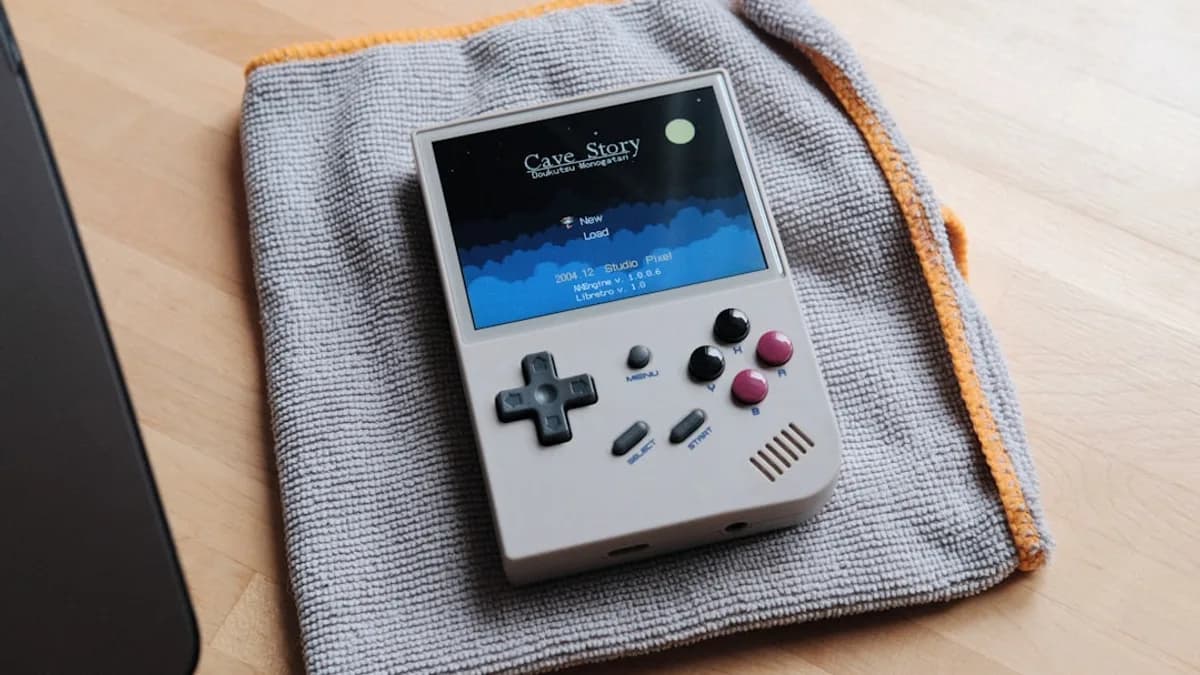
a nintendo game boy sitting on top of a blanket
TechnologyMay 15, 2026· 5 min read· By Dev Kapoor

Anbernic RG DS Runs Linux Without Killing Android OS

Share

MLXIO Intelligence

Analysis Snapshot

60
Moderate
Confidence: LowTrend: 10Freshness: 96Source Trust: 100Factual Grounding: 95Signal Cluster: 20

Moderate MLXIO Impact based on trend velocity, freshness, source trust, and factual grounding.

Thesis

High Confidence

Anbernic's RG DS now supports a Linux-based OS installed via microSD card, allowing users to run Linux without removing or modifying the pre-installed Android OS.

Evidence

  • The Linux OS can be installed on a microSD card, leaving the factory Android install untouched.
  • Users can switch between Android and Linux by inserting or removing the microSD card, with no need for risky flashing or overwriting.
  • The installation process is straightforward and does not require complex bootloaders.

Uncertainty

  • It is unclear if the Linux OS supports all device hardware out of the box.
  • No data is provided on performance differences, battery life, or emulator compatibility between Android and Linux.

What To Watch

  • Reports on hardware compatibility and driver support for the Linux OS.
  • User feedback on performance, battery life, and emulator stability under Linux.
  • Ongoing updates or community development for the Linux OS on RG DS.

Verified Claims

Anbernic RG DS users can run a Linux-based OS without removing the pre-installed Android OS.
📎 The Linux OS installs on a microSD card, leaving the factory Android install untouched.High
Installing the Linux OS on the Anbernic RG DS does not risk data loss or require flashing the device.
📎 No risky flashing, no data loss, just more options out of the box.High
Switching between Android and Linux on the RG DS is done by inserting or removing the microSD card and rebooting.
📎 Remove the card and Android resumes control—no complex bootloaders, no risky overwriting.High
The Linux OS installation process for the RG DS is similar to updating a Raspberry Pi or installing custom firmware on other handhelds.
📎 If you’ve ever updated a Raspberry Pi or installed custom firmware on a handheld, you’re already familiar with the workflow.Medium
It is unclear if the Linux OS supports all RG DS hardware out of the box.
📎 What’s less clear is whether the Linux OS supports all device hardware out of the box or if users will need to hunt down device-specific drivers.Medium

Frequently Asked

Can I install Linux on my Anbernic RG DS without deleting Android?

Yes, the Linux OS installs on a microSD card, so the original Android OS remains untouched.

How do I switch between Android and Linux on the Anbernic RG DS?

You switch by inserting the microSD card with Linux to boot into Linux, or removing it to return to Android, then restarting the device.

Is installing Linux on the RG DS risky or does it erase my data?

No, installing Linux via microSD card does not risk data loss or require flashing the device.

What are the benefits of running Linux on the Anbernic RG DS?

Linux offers access to open-source emulators, minimal interfaces, and potentially lower resource use compared to Android.

Does the Linux OS support all hardware features of the RG DS?

It is not clear if all hardware is supported by the Linux OS out of the box; users may need to find device-specific drivers.

Updated on May 15, 2026

Why Anbernic RG DS Users Should Care About the New Linux OS Option

Anbernic’s RG DS just gained a new trick: owners can now run a Linux-based operating system without erasing the Android OS the device ships with. That means retro gaming fans get a second, open platform—no risky flashing, no data loss, just more options out of the box. For a dual-screen handheld, this flexibility is rare. Users who want to switch between Android’s touch-focused apps and a more classic, emulator-friendly Linux environment can do so at will, expanding what a $100-class console can do in daily use.

According to Notebookcheck, the Linux system installs on a microSD card, leaving the factory Android install untouched. For anyone who’s hesitated to tinker with firmware for fear of bricking their device, this is a substantial safety net. The new OS opens the door to the broader world of open-source gaming platforms—something Android alone never quite nails for emulator enthusiasts.

How the New Linux OS Installation Works Without Removing Android on Anbernic RG DS

The process is refreshingly straightforward: download the Linux build, flash it to a microSD card, and insert the card into the RG DS. On boot, the device loads Linux from the card, not from its internal storage. Remove the card and Android resumes control—no complex bootloaders, no risky overwriting of the device’s main OS.

This sidestep ensures that users don’t lose their existing apps, saves, or settings. The technical barrier is low; if you’ve ever updated a Raspberry Pi or installed custom firmware on a handheld, you’re already familiar with the workflow. Anbernic’s approach means you can trial Linux without commitment. If something goes wrong, just pop out the card and you’re back to stock. This method also appeals to power users who want to keep their Android setup untouched for specific apps while experimenting with open-source tools on Linux.

What’s less clear is whether the Linux OS supports all device hardware out of the box or if users will need to hunt down device-specific drivers. For now, the install method is about as risk-free as firmware mods get.

What Advantages Does Running Linux OS Bring to the Anbernic RG DS Gaming Experience?

Linux on handhelds is about control. Android is versatile, but it often comes with extra overhead and closed-off customization. By running Linux, RG DS owners tap into a world of open-source emulators, minimal interfaces, and potentially lower system resource use. For retro gamers, this means faster boot times, less bloat, and an interface that’s tuned for gamepad navigation rather than touch.

The ability to swap operating systems also opens new possibilities for emulator compatibility. Many open-source emulation projects focus first on Linux support before Android, so users could see more stable or full-featured emulators on this platform. Linux’s strong community culture often means faster bug fixes and more frequent updates for niche devices—assuming Anbernic or independent developers stay engaged.

Analysis: The actual performance difference between Android and Linux on the RG DS isn’t detailed in the source. There’s no hard data on framerates, battery life, or emulator compatibility yet. But the move signals Anbernic’s willingness to offer a less locked-down experience, which is rare among major handheld vendors.

Can You Easily Switch Between Android and Linux on the Anbernic RG DS? A User’s Perspective

The switching process is direct: power down, remove the microSD card (to return to Android) or insert the card (to boot Linux), and restart. There’s no dual-boot menu or software toggle—just a physical swap. For users, this means the device’s role can change in seconds: Android for multimedia apps and wireless updates, Linux for focused gaming sessions and custom setups.

From a practical standpoint, this is as close to seamless as dual-OS handhelds get with current hardware. There’s no need to reconfigure BIOS settings or risk bootloader corruption. The only real friction point is needing to power off the device to swap cards, but for most, that’s a minor inconvenience compared to the benefit of instant reversibility.

What we don’t know: The source does not specify whether both OSes can access the same user data on shared storage, or if save files and ROMs need to be duplicated. That will matter for anyone managing a large library or switching OSes frequently.

What Should Potential Buyers Know About Choosing Between Android and Linux on the RG DS?

Android excels at app support and general-purpose use—think streaming, touch-based games, and easy access to the Play Store. Linux, on the other hand, leans into a purer, retro-focused gaming experience with broader customization. The dual-OS approach means you don’t have to choose: buy once, and experiment freely.

For most users, Android is the familiar safety net. For tinkerers and emulation diehards, Linux could unlock better compatibility and more control. The fact that both options coexist—without the risk of wiping your device—raises the RG DS’s value proposition.

If you’re on the fence, consider how you’ll use the device day-to-day. If you want an out-of-the-box experience with apps and updates, stick with Android. If you prefer fine-tuned emulation and open-source ecosystems, try the Linux install. For help, Anbernic’s forums and user communities are likely to be the best source of troubleshooting and tips.

What Remains Unclear and What to Watch Next

Key questions are still unanswered: How mature is the Linux OS? Will Anbernic or the community keep it updated? Can users expect full hardware support and reliable emulator performance? Details on file sharing between OSes, specific emulator compatibility, and long-term support are missing.

What to watch: User reports on stability, emulator support, and whether the Linux OS receives regular updates. If the community rallies around this dual-OS setup, the RG DS could become the template for future handhelds—where open platforms aren’t just a bonus, but the standard. Until more hands-on reviews and data appear, cautious optimism is the right stance.

Key Takeaways

  • RG DS owners can now run Linux without uninstalling Android, increasing flexibility and safety.
  • Installing Linux on a microSD card avoids risky firmware changes and preserves existing data.
  • The new option makes it easier for retro gaming fans to access emulator-friendly open-source software.
DK

Written by

Dev Kapoor

Consumer Tech & Gadgets Reviewer

Dev reviews smartphones, laptops, wearables, smart home devices, and consumer electronics. He focuses on real-world performance, value-for-money analysis, and helping readers find the best tech for their needs and budget.

SmartphonesLaptopsWearablesSmart HomeConsumer Electronics

Related Articles

black android smartphone displaying qr code
TechnologyMay 15, 2026

Android Cracks iPhone File Sharing With QR Code Magic

Android users can now send files to iPhones via QR codes, ending years of clunky cross-platform sharing struggles.

6 min read

green frog iphone case beside black samsung android smartphone
TechnologyMay 15, 2026

Google Sparks Android Dialer Revolution with VoIP Integration

Google’s Android dialer update merges VoIP calls into one app, simplifying voice communication and ending the hassle of multiple calling platforms.

8 min read

black smartphone
TechnologyMay 14, 2026

Xiaomi 17 Max Sparks Flagship Battle with Huge Battery and Screen

Xiaomi 17 Max targets power users with a giant screen and the biggest battery in the series, powered by a flagship Snapdragon chipset.

3 min read

a tablet computer sitting on top of a table
TechnologyMay 14, 2026

iQoo Sparks Flagship Race with 4K Pad 6 Pro and 15T Launch

iQoo reveals the Pad 6 Pro with a rare 4K display and teases the speedy 15T smartphone, aiming to dominate the flagship Android segment.

4 min read

a wooden table topped with different types of cameras
TechnologyMay 15, 2026

Sigma BF Teardown Reveals Tiny Full-Frame Camera Revolution

Sigma BF teardown reveals a pocket-sized full-frame camera built for minimalists craving serious image quality and easy repairs.

5 min read

people walking on white floor tiles
TechnologyMay 16, 2026

Apple Slashes iPhone Prices in China Before 618 Festival

Apple is aggressively discounting iPhones in China ahead of the 618 festival, aiming to boost sales during one of the country's largest shopping events.

3 min read

a desk with a laptop on top of it
TechnologyMay 16, 2026

LiberNovo Maxis Redefines Comfort for Big and Tall Users

LiberNovo’s Maxis chair offers tailored ergonomic support and dynamic comfort designed specifically for big and tall professionals.

4 min read

person holding black samsung android smartphone
TechnologyMay 15, 2026

Ugreen Sparks Buzz with Soccer Ball Bluetooth Tracker

Ugreen launches a soccer ball-shaped Bluetooth tracker that integrates with Apple Find My, targeting World Cup fans with a unique design.

4 min read

turned on LED projector on table
TechnologyMay 15, 2026

Honor Choice AI Projector Pro Sparks Home Entertainment Shift

Honor’s affordable AI Projector Pro challenges traditional TVs by combining smart features and ease of use, shaking up the home entertainment market.

6 min read

Intel computer processor in selective color photography
TechnologyMay 15, 2026

Apple Tests Intel Chips, Threatening TSMC's iPhone Monopoly

Apple trials Intel's chip production for iPhones, challenging TSMC's decade-long dominance and aiming to diversify its supply chain.

6 min read

Stay ahead of the curve

Get a weekly digest of the most important tech, AI, and finance news — curated by AI, reviewed by humans.

No spam. Unsubscribe anytime.