MLXIO
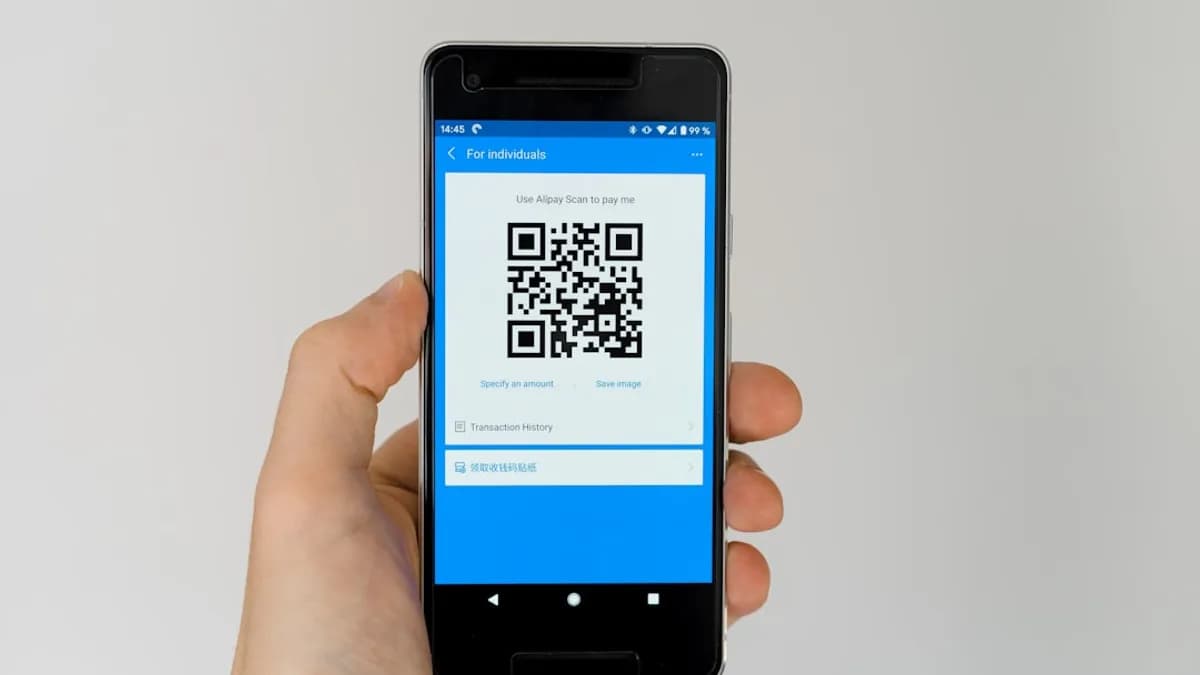
black android smartphone displaying qr code
TechnologyMay 15, 2026· 6 min read· By Dev Kapoor

Android Cracks iPhone File Sharing With QR Code Magic

Share

MLXIO Intelligence

Analysis Snapshot

73
High
Confidence: MediumTrend: 10Freshness: 95Source Trust: 100Factual Grounding: 95Signal Cluster: 40

High MLXIO Impact based on trend velocity, freshness, source trust, and factual grounding.

Thesis

High Confidence

Google's new Quick Share QR code feature enables Android users to share files directly with iPhones, overcoming previous cross-platform barriers.

Evidence

  • The feature was announced during The Android Show: I/O Edition.
  • Android users can generate a QR code for selected files, which iPhone users scan to download via a web link.
  • The transfer uses cloud upload, not device-to-device or Bluetooth, and does not require extra apps on the iPhone.
  • Google states the feature will roll out to all Android phones over the coming weeks.

Uncertainty

  • Details about file size limits or expiration of QR code links are not specified.
  • Security specifics beyond QR code access are not discussed.
  • Adoption rate and user experience across different Android and iOS versions remain unknown.

What To Watch

  • Monitor rollout progress and availability across Android devices.
  • Watch for user feedback on security, speed, and reliability.
  • Look for Apple’s response or potential updates to AirDrop for cross-platform compatibility.

Verified Claims

Google has introduced a QR code-based file sharing feature in Quick Share for Android devices.
📎 Google is rolling out a new feature on Quick Share on Android that allows users to send files to iOS devices using a QR code.High
The new Quick Share QR code feature enables Android users to share files with iPhone users without needing both devices on the same network.
📎 No need for both devices to be on the same network, no extra apps on the iPhone, no wrestling with Bluetooth settings.High
Files shared via Quick Share QR codes are uploaded to the cloud and accessed by scanning the code with an iPhone camera.
📎 The transfer isn’t device-to-device; instead, the files are uploaded from the Android phone to the cloud. The QR code essentially acts as a one-time pass, granting access to the recipient.High
The QR code sharing method does not require any special apps or software on the iPhone—just a camera and web access.
📎 The iPhone doesn’t need any special software or to be physically close, just a camera and web access.High
Google is rolling out this Quick Share QR code feature to all Android phones over the coming weeks.
📎 Google says this method will roll out to all Android phones over the coming weeks.High

Frequently Asked

How do I share files from Android to iPhone using Quick Share QR codes?

Open Quick Share on your Android, select files, choose the QR code option, and have the iPhone user scan the code with their camera to download via a web link.

Do I need a special app on my iPhone to receive files from Android via Quick Share QR code?

No, you only need your iPhone’s camera and internet access; the files are downloaded through a web page.

Is the Quick Share QR code feature available on all Android devices?

Google is rolling out the feature gradually, so it may not appear on all Android phones immediately.

Are files sent via Quick Share QR code transferred directly between devices?

No, files are uploaded to the cloud and accessed by the recipient through a unique QR code link.

Is the Quick Share QR code method secure?

Only someone with the QR code can access the files, but you should trust anyone you show the code to since it grants direct access.

Updated on May 15, 2026

Android and iPhone File Sharing: The Wall Finally Cracks

Until now, swapping files between Android and iPhone felt like an endurance test. Users bounced between clunky email attachments, messaging apps that compressed images into blurry pixels, or third-party services that introduced friction — and sometimes, privacy headaches. For people moving between iOS and Android at work, school, or home, these barriers weren’t just irritating; they slowed down group projects, muddled event planning, and complicated even the simplest collaboration.

The real pain point? While Apple’s AirDrop and Android’s Quick Share both made sharing inside their own walls effortless, those walls didn’t talk. That left anyone in a mixed-device group relying on awkward workarounds. The new QR code feature, announced at The Android Show: I/O Edition, promises to bulldoze that wall and make cross-platform transfers trivial, according to Gsmarena.

How Quick Share QR Codes Bridge the Divide

Google’s latest update to Quick Share introduces a new sharing method: generate a QR code on your Android, scan it with an iPhone, and your files move across the gap. No need for both devices to be on the same network, no extra apps on the iPhone, no wrestling with Bluetooth settings.

Here’s how it works: The Android user selects the files to share, then taps the new ‘Use QR code’ option in Quick Share. Instantly, a QR code pops up on the Android screen. The iPhone user points their camera at the code — just like scanning a restaurant menu — and a web page opens in Safari, ready to download the files.

The transfer isn’t device-to-device; instead, the files are uploaded from the Android phone to the cloud. The QR code essentially acts as a one-time pass, granting access to the recipient. This means the iPhone doesn’t need any special software or to be physically close, just a camera and web access. Google says this method will roll out to all Android phones over the coming weeks.

Why QR Codes Are a Win for Cross-Platform Sharing

The QR code approach flips the usual pain points. There’s no need to mess with device settings or visibility toggles. It’s a visual handshake — one user generates, the other scans.

Security-wise, the sharing process keeps things simple: only someone with the QR code can grab the files, which should limit accidental or unwanted downloads. Of course, this also means you need to trust anyone you show the code to, since it grants direct access to what you’ve shared. Compared to the messy relay of sending files through group chats or uploading to random cloud services, this is faster, cleaner, and less likely to mangle your content.

Speed and convenience get a lift, too. You’re not left waiting for Bluetooth pairing or for both devices to agree on a protocol; a scan and a tap and the transfer is underway. For quick, in-person exchanges — think snapping a group photo and sharing it with friends who have iPhones — this is as close to frictionless as Android and iOS have come.

How to Share Files From Android to iPhone with a QR Code

The process is straightforward:

  1. On Android: Open Quick Share and pick the files or photos you want to send.
  2. Choose QR Code: Tap the option to generate a QR code. Your phone instantly creates one, displaying it on the screen.
  3. On iPhone: Open the Camera app and point it at the QR code. A notification pops up — tap it.
  4. Download: The iPhone’s browser opens to a web page where the shared file can be downloaded directly.

If the QR code doesn’t scan, check for camera focus or try increasing the screen brightness on the Android device. If nothing happens, make sure both devices are connected to the internet; the file is delivered through a cloud link, not a direct wireless transfer. If you don’t see the QR code feature on your Android yet, Google says it’s rolling out gradually.

One limitation: anyone with the code can access the file, so don’t display it in crowded spaces or on social media. Think of the QR code as a disposable key — hand it only to the person meant to unlock the door.

Case Study: Sharing Event Photos in Seconds

Picture a group at a birthday party: two Android users, several iPhone devotees. In the past, sharing high-res photos across devices meant sending links in group chats, waiting for uploads, or giving up and letting someone snap a blurry photo of your phone screen. With the new Quick Share QR code feature, the Android user selects the best shots, taps to generate a code, and the iPhone users take turns scanning. Each gets the full-quality files in moments, no apps, no accounts, no lost details.

The time savings stack up. What used to take several minutes — or devolve into “I’ll email you later” — is instant. And collaboration is tighter, whether you’re sharing meeting notes, event photos, or a must-read PDF.

What We Know, What’s Still Unclear, What to Watch

What We Know: Google’s QR code-based Quick Share is live for many Android devices and rolling out to all, targeting the devices that can’t yet use the new AirDrop-style direct transfers. Files are sent via the cloud, accessed by scanning a QR code with an iPhone.

Why It Matters: This finally cracks the wall between Android and iOS for everyday sharing — no third-party hacks, no device compatibility drama, just a quick visual handshake. For families, teams, and friend groups mixing devices, it’s a real quality-of-life upgrade.

What’s Still Unclear: The source doesn’t specify how long files stay available, detailed limits on file size, or what security measures Google uses behind the scenes. There’s also no word yet on how group sharing works (for example, if multiple people can scan the same code simultaneously) or whether the QR code expires after a set period.

What to Watch: Google says native AirDrop compatibility is also expanding to more Android phones this year. Meanwhile, Quick Share’s QR code method could become the de facto standard for ad-hoc, cross-platform sharing — especially in public spaces or work settings. Also, Google has hinted at bringing these tools into more apps, so look for Quick Share integration inside major messaging platforms soon.

Bottom Line: Sharing Gets Smarter — If You’re Ready

For Android users, the QR code upgrade means less friction and fewer excuses. If you’ve hesitated to share files with iPhone friends or colleagues, the process just got easier. Watch for the feature to appear in your Quick Share menu soon — and, when it does, try it the next time you need to send a file on the fly. This is the closest Android and iOS have come to speaking the same language for file sharing, and that’s a shift worth using.

Why It Matters

  • Cross-platform file sharing between Android and iPhone is now simple and does not require extra apps.
  • The new QR code method reduces friction for mixed-device groups in work, school, and social settings.
  • Users benefit from improved privacy and convenience compared to previous clunky or insecure methods.

File Sharing Methods: Before vs. After QR Code Update

MethodEase of UseCross-Platform CompatibilityPrivacy Concerns
Email AttachmentsLowYesMedium
Messaging AppsMediumYesHigh (compression, platform limits)
Third-party ServicesMediumYesVaries
AirDrop/Quick Share (old)HighNoLow
Quick Share QR Code (new)HighYesLow
DK

Written by

Dev Kapoor

Consumer Tech & Gadgets Reviewer

Dev reviews smartphones, laptops, wearables, smart home devices, and consumer electronics. He focuses on real-world performance, value-for-money analysis, and helping readers find the best tech for their needs and budget.

SmartphonesLaptopsWearablesSmart HomeConsumer Electronics

Related Articles

green frog iphone case beside black samsung android smartphone
TechnologyMay 15, 2026

Google Sparks Android Dialer Revolution with VoIP Integration

Google’s Android dialer update merges VoIP calls into one app, simplifying voice communication and ending the hassle of multiple calling platforms.

8 min read

black remote control on red table
TechnologyMay 14, 2026

OpenAI Lets You Control Codex Remotely from ChatGPT iPhone App

OpenAI enables remote Codex control through ChatGPT on iPhone, letting developers manage AI coding tasks away from their Macs.

3 min read

person holding space gray iPhone 7
TechnologyMay 14, 2026

iPhone 17 Sales Surge as US Smartphone Market Shrinks

Apple’s iPhone 17 sales rise in Q1, bucking the US smartphone market decline and edging out Android competitors.

4 min read

Black smartphone placed on a black laptop.
TechnologyMay 14, 2026

iPhone 17 Pro Crushes 32 Phones with Fastest Charging Speed

The iPhone 17 Pro tops 33 phones tested for fastest charging by optimizing real-world wired and wireless efficiency, not just wattage specs.

6 min read

black smartphone
TechnologyMay 14, 2026

Xiaomi 17 Max Sparks Flagship Battle with Huge Battery and Screen

Xiaomi 17 Max targets power users with a giant screen and the biggest battery in the series, powered by a flagship Snapdragon chipset.

3 min read

turned on LED projector on table
TechnologyMay 15, 2026

AWOL Vision Sparks Frenzy with €1,400 Off 4K Laser UST Projectors

AWOL Vision’s new 4K laser UST projectors offer up to €1,400 off in pre-orders, shaking up the premium home cinema market with aggressive early discounts.

4 min read

a cell phone on a table
TechnologyMay 15, 2026

Realme Sparks Finnish Comeback as OnePlus Exits Europe

Realme returns to Finland on May 18 with three devices, aiming to seize market share as OnePlus retreats from Europe.

4 min read

person holding space gray iPhone 5s taking picture
TechnologyMay 15, 2026

Sony’s Xperia 1 VIII AI Camera Sparks Viral Meme Roast

Sony’s Xperia 1 VIII AI Camera backfires, spawning viral memes that mock its overexposed, amateurish edits and highlight AI hype risks.

4 min read

a close up of an apple laptop computer
TechnologyMay 15, 2026

Apple Slashes 2TB M5 Pro MacBook Pro to All-Time Low

Apple drops the 2TB M5 Pro MacBook Pro to its lowest price ever, signaling a shift in premium laptop pricing and market strategy.

8 min read

shallow focus photo of Apple AirPods
TechnologyMay 15, 2026

Apple Card Promo Snags You Free AirPods Pro 3 Instantly

Apple’s Apple Card promo gives new users free AirPods Pro 3, marking a bold move to attract high-spending customers with premium rewards.

4 min read

Stay ahead of the curve

Get a weekly digest of the most important tech, AI, and finance news — curated by AI, reviewed by humans.

No spam. Unsubscribe anytime.