MLXIO
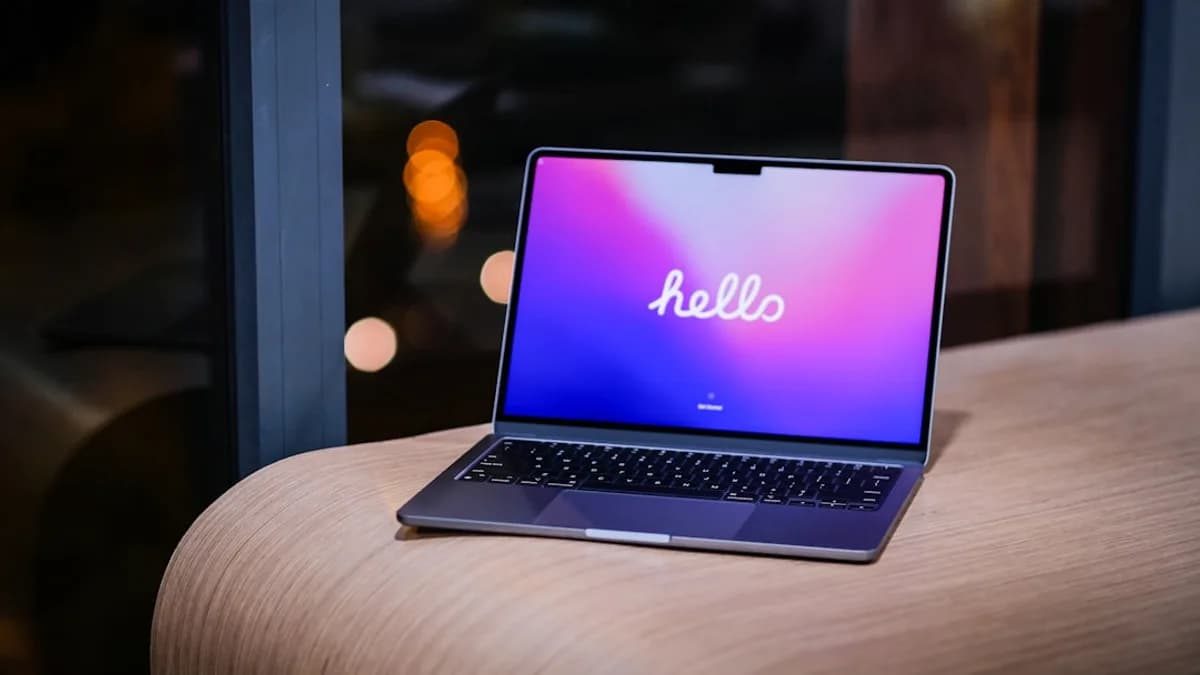
a laptop on a table
TechnologyJune 16, 2026· 5 min read· By MLXIO Insights Team

Liquid Glass Finally Makes Outlook for Mac Feel Native

Share

MLXIO Intelligence

Analysis Snapshot

68
High
Confidence: LowTrend: 10Freshness: 99Source Trust: 100Factual Grounding: 88Signal Cluster: 20

High MLXIO Impact based on trend velocity, freshness, source trust, and factual grounding.

Thesis

High Confidence

Microsoft’s app-wide Liquid Glass update makes Outlook for Mac look more native to current macOS conventions, while the clearest functional addition is PST import support.

Evidence

  • Outlook for Mac now applies Liquid Glass visuals app-wide, including app chrome, windows, buttons, and key controls.
  • Microsoft highlighted smoother motion and Liquid Glass effects for the primary New button, plus increased elevation and background effects for metaOS and Profile UI controls.
  • The update adds Import PST support for emails, calendars, contacts, and other mailbox data from PST files.
  • Word for Mac and PowerPoint for Mac received bug fixes and performance improvements in the same update cycle.

Uncertainty

  • The supplied material does not define metaOS.
  • The source does not claim performance, search, triage, or account-management improvements from the redesign.
  • User reception to the Liquid Glass changes is not included.

What To Watch

  • Whether Microsoft extends Liquid Glass treatment to more Microsoft 365 Mac apps.
  • User feedback on whether the redesign feels more native or introduces usability friction.
  • Further details on PST import reliability and supported migration scenarios.

Verified Claims

Microsoft has released an app-wide Liquid Glass redesign for Outlook for Mac.
📎 Microsoft has pushed an app-wide Liquid Glass redesign to Outlook for Mac, changing the mail client’s broader interface.High
The Outlook for Mac Liquid Glass update affects app chrome, windows, buttons, and key controls rather than only one screen.
📎 The update reaches the app chrome, windows, buttons and key controls, not just a single compose window or sidebar.High
Outlook for Mac now supports importing PST files.
📎 The release also adds Import PST support to Outlook for Mac.High
Microsoft says Import PST can bring emails, calendars, contacts, and other mailbox data from PST files into Outlook for Mac.
📎 Microsoft says the feature makes it easy to import emails, calendars, contacts, and other mailbox data from PST files.High
Word for Mac and PowerPoint for Mac received bug fixes and performance improvements in the same update cycle.
📎 Word for Mac and PowerPoint for Mac received bug fixes and performance improvements.High

Frequently Asked

What changed in the Outlook for Mac Liquid Glass update?

Outlook for Mac received an app-wide Liquid Glass redesign affecting the broader interface, including app chrome, windows, buttons, and key controls.

Does the Liquid Glass update change Outlook for Mac email and calendar behavior?

Based on the supplied release details, the redesign is mainly an interface modernization, not a broad rewrite of Outlook’s core mail, calendar, or account-management behavior.

What PST feature was added to Outlook for Mac?

Outlook for Mac added Import PST support, allowing users to import emails, calendars, contacts, and other mailbox data from PST files.

Where is the new Outlook for Mac update available?

The new Outlook for Mac update is available on the App Store now.

Did Word for Mac and PowerPoint for Mac get Liquid Glass redesigns too?

The supplied notes only say Word for Mac and PowerPoint for Mac received bug fixes and performance improvements; they do not claim Liquid Glass redesigns for those apps.

Updated on June 16, 2026

Microsoft has pushed an app-wide Liquid Glass redesign to Outlook for Mac, changing the mail client’s broader interface rather than polishing one isolated screen. The update matters most to Mac users who live in Outlook daily and expect Microsoft’s email app to look less out of place on Apple hardware, according to 9to5Mac .

The release also adds Import PST support to Outlook for Mac, while Word for Mac and PowerPoint for Mac received bug fixes and performance improvements. The new Outlook update is available on the App Store now.

Microsoft rolls out an app-wide Liquid Glass redesign for Outlook on Mac

Microsoft’s headline change is visual: Outlook for Mac now applies Liquid Glass styling across the app. That means the update reaches the app chrome, windows, buttons and key controls, not just a single compose window or sidebar.

Outlook now applies Liquid Glass visuals “app-wide with a focus on a more expressive, cohesive and Tahoe-native experience.”

The practical question: does this change how Outlook handles email and calendars? Based on the supplied release details, the redesign is mainly an interface modernization, not a broad rewrite of Outlook’s core mail, calendar or account-management behavior.

Microsoft called out three Liquid Glass-focused changes:

Outlook for Mac area Microsoft’s stated change
Primary “New” button Refactored with smoother motion design and Liquid Glass effects
metaOS and Profile UI control Increased elevation and Liquid Glass background effects
App chrome, windows and buttons Increased radii to make the app feel familiar to Tahoe/macOS 26 customers

Microsoft’s note references metaOS without defining it in the supplied material. In this context, the safest read is that it refers to a named Outlook UI layer or control area rather than a separate user-facing feature.

The update also lands as Apple’s own Mac interface language is moving deeper into Liquid Glass. For readers tracking that shift, see MLXIO’s related coverage of Liquid Glass Gets a Dial—macOS 27 Golden Gate Blinks and Liquid Glass Grabs Pocket Casts in Major iOS Redesign.


Liquid Glass gives Outlook for Mac a more native macOS feel

The user-facing effect should be straightforward: Outlook for Mac should look more aligned with current Mac visual conventions. Rounder windows and buttons, more pronounced elevation, and Liquid Glass background effects are meant to reduce the “ported app” feel that can stand out on macOS.

For app builders, the signal is also clear. Microsoft is not just matching a color palette. It is tuning motion, depth and control shape around Apple’s newer interface direction while keeping Outlook’s existing role as a Microsoft productivity app.

Where does that leave Mac-heavy teams that rely on Outlook? The strongest supported takeaway is consistency, not a promised productivity boost. The source material does not claim faster triage, better search, lower memory use, or fewer clicks from the Liquid Glass work.

The bigger functional addition is Import PST. Microsoft says the feature makes it “easy to import emails, calendars, contacts, and other mailbox data from PST files.” That is a concrete workflow improvement for users who need to bring Outlook data files into the Mac app.

The update is not just cosmetic, but the design work leads

The release bundles interface polish with PST import support, which makes the update more than a skin. Still, the Liquid Glass refresh is the story Microsoft is pushing hardest in the supplied details.

Word and PowerPoint are part of the same update cycle, but their changes are narrower in the available notes: bug fixes and performance improvements. There is no source-confirmed claim that those apps received the same app-wide Liquid Glass treatment today.

Outlook for Mac users should watch rollout timing and interface changes

The immediate action is simple: check the App Store for the latest Outlook for Mac update. If Outlook was installed through another managed path, users and admins should check their normal update channel, but the source specifically confirms App Store availability.

The rollout question: will every Outlook for Mac user see the same interface at the same time? The supplied material does not specify release channels, staged availability, account-type limits or regional timing. That leaves some room for variation depending on how the app is installed and updated.

For individual users, the likely adjustment is visual muscle memory. The primary “New” button has new motion and Liquid Glass effects, profile controls have more elevation, and windows and buttons have larger radii.

For IT teams, the sensible move is to verify the version before fielding support questions. The release notes described here point to UI changes that users will notice, even if core Outlook workflows remain familiar.

There is also no source-confirmed rival response. The market signal is narrower and more useful: Microsoft is willing to spend design effort making a flagship Mac app feel native to Apple’s current interface direction.

The next release-note item to watch is whether Microsoft extends this same app-wide Liquid Glass approach deeper into Word for Mac and PowerPoint for Mac. Today, Outlook got the visual overhaul; the rest of the Office for Mac updates, based on the supplied details, stayed focused on fixes and performance.

Key Takeaways

  • Outlook for Mac now looks more aligned with Apple’s current macOS design language.
  • Import PST support makes it easier for Mac users to move or restore Outlook email data.
  • The update is mainly a visual modernization rather than a major change to core mail and calendar features.


Microsoft Mac App Updates

AppUpdate
Outlook for MacApp-wide Liquid Glass redesign and Import PST support
Word for MacBug fixes and performance improvements
PowerPoint for MacBug fixes and performance improvements
MLXIO

Written by

MLXIO Insights Team

Algorithmic Research & Human Oversight

Powered by advanced algorithmic research and perfected by human oversight. The Insights Team delivers highly structured, cross-verified analysis on emerging tech trends and digital shifts, filtering out the fluff to give you high-fidelity value.

Related Articles

silver macbook on white table
TechnologyJun 9, 2026

Liquid Glass Gets a Dial—macOS 27 Golden Gate Blinks

macOS 27 Golden Gate keeps Liquid Glass, but adds contrast fixes, cleaner windows, and a slider to quiet Tahoe backlash.

8 min read

man in black nike hoodie wearing black headphones
TechnologyJun 10, 2026

Liquid Glass Grabs Pocket Casts in Major iOS Redesign

Pocket Casts 8.13 brings Apple’s Liquid Glass to iOS, giving queues, shows, and playback a more translucent, layered look.

6 min read

a cell phone and a laptop on a table
TechnologyJun 15, 2026

Golden Gate Lets iPhone Mirroring Escape Its Tiny Box

Golden Gate makes iPhone Mirroring resizable, turning a rigid phone strip into a more useful Mac productivity surface.

11 min read

Silver smartphone resting on a black laptop.
TechnologyJun 16, 2026

iOS 27 Indexing Stuck? Your Mac Reveals the Truth

iOS 27’s stuck indexing banner may not be stuck at all. A Mac log can reveal the real completion percentage.

8 min read

silver iMac, keyboard, and mouse
TechnologyJun 9, 2026

5K at 120Hz Makes macOS 27 Golden Gate Less Apple-Locked

macOS 27 Golden Gate adds 5K at 120Hz ultrawide support, making third-party monitors feel less clumsy for docked Macs.

10 min read

the apple logo is reflected in the glass of a building
AI / MLJun 9, 2026

New Siri AI Locks Voice Controls Behind Apple’s Newest Gear

Apple’s Siri AI voice controls won’t reach many devices that can run iOS 27, putting a flashy feature behind new hardware.

6 min read

a rocket is flying through the air on a foggy day
AI / MLJun 3, 2026

Tesla and SpaceX Emails Drag Musk Into Apple OpenAI Suit

Musk must search Tesla and SpaceX emails as the Apple-OpenAI lawsuit pushes into his wider corporate orbit.

10 min read

person holding black android smartphone
AI / MLJun 9, 2026

12GB RAM Gate Turns Apple AI Into a Costly Upgrade Trap

Apple’s AI rollout now hinges on location, 12GB RAM and iCloud+, turning intelligence into an upgrade funnel.

7 min read

man sitting on gang chair during daytime
CreatorsJun 16, 2026

Eight More Trips Drag Eugene Levy Back to Apple TV

Apple TV renewed The Reluctant Traveler for Season 4, with Eugene Levy returning for eight more episodes.

5 min read

grayscale photo of person holding glass
TechnologyJun 16, 2026

Key Trends Reveal Who Wins Next — and Who Gets Left

Key trends point to shifting stakes ahead, with winners and laggards likely to emerge fast.

1 min read

Stay ahead of the curve

Get a weekly digest of the most important tech, AI, and finance news — curated by AI, reviewed by humans.

No spam. Unsubscribe anytime.