

Introduction to the Motorola Razr 70: What to Expect from the Upcoming Foldable
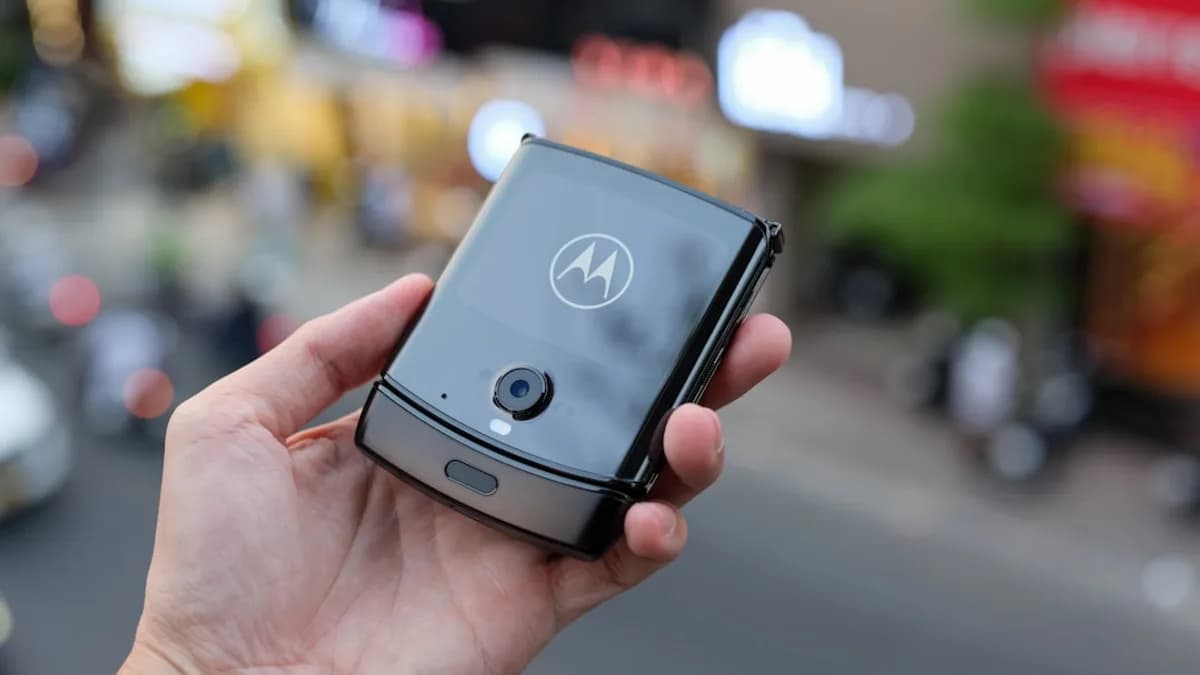
Motorola Razr 70 appeared online days before its official launch, hinting at new features and a fresh look for the famous flip phone. The Razr 70 is part of Motorola’s push to stand out in the foldable phone crowd. This model follows the Razr (2026) and Razr+ (2026), which are expected to cost more than last year’s phones—starting at $799 and going as high as $1,899 for the Fold model [Source: Google News].
These higher prices come with repetitive specs, according to leaks, but Motorola wants to bring back what made Razr phones "iconic" in the first place. The Razr 70 could mark a turning point for the company, as it tries to pull ahead in the foldable phone race. If you’re curious about buying or upgrading to a foldable, the Razr 70 promises to be a strong option. Let’s break down how to pick the right model, get ready for launch, and make the most of your new phone.
How to Choose the Right Motorola Razr 70 Model Based on Features and Price
Choosing the best Razr 70 model means looking at what’s new, what’s different, and how much you’ll pay. Rumors point to two main versions: the Razr 70 and the Razr+ (2026). The Razr 70 is likely to cost less and offer basic foldable features. The Razr+ is expected to include extra perks, a faster chip, and a fancier screen, but at a higher price [Source: Google News].
For example, reports say the Razr+ could have a bigger external display, improved cameras, and more memory. If you often take photos or want a phone that feels fast and smooth, the Razr+ might fit you. But if you just need a solid phone that folds and saves you money, the regular Razr 70 should do the trick.
Think about how you use your phone. Do you stream videos, play games, or multitask a lot? Then the Razr+ is probably worth the extra cost. If you mostly call, text, and check emails, the Razr 70 gives you the foldable style without breaking the bank.
Also, watch out for price hikes. The leaked prices are much higher than last year, so make sure the features match what you need. Compare specs like battery life, camera quality, and storage. Ask yourself if you need the latest and greatest, or if a simpler model is enough.
If you’re upgrading from an older Razr, check for trade-in deals. Sometimes you can save a lot by swapping your old phone for credit toward a new one. Take time to read reviews and user feedback when the phones launch. That way, you’ll know if the Razr 70 or Razr+ is the right model for you.
How to Prepare for the Motorola Razr 70 Launch and Purchase
Getting ready for the Razr 70 launch means keeping your eyes open for news and deals. Motorola usually posts official updates on its website and social media. Follow their channels, and sign up for email alerts. Reliable tech sites like GSMArena and 9to5Google also share updates as soon as they hear about release dates and pricing [Source: Google News].
Pre-orders can give you a head start, especially if you want a popular color or model. Make sure you know the exact launch date and time, so you don’t miss out. Some stores offer bonuses like free cases or extra warranty if you pre-order early.
When it’s time to buy, stick to trusted retailers. Motorola’s online store is safe. Big names like Amazon, Best Buy, and major carriers are also good bets. Avoid less-known sellers, especially if prices look too high or too low.
Compare prices before you click "buy." Leaked info says prices could be steep, so look for discounts, bundle deals, or trade-in offers. If you’re not in a rush, waiting a few weeks after launch can sometimes lead to price drops as stores compete for buyers.
How to Maximize Your Experience with the Motorola Razr 70 Foldable Phone
To get the most out of your Razr 70, start with setting it up right. When you turn on your phone for the first time, follow the setup wizard. Connect to Wi-Fi, sign in with your Google account, and update your apps. This will make sure your phone runs fast and stays secure.
Foldable phones need extra care. Avoid bending the phone backwards or pressing hard on the screen. Use both hands when folding or unfolding. Keep your Razr 70 away from sand, water, and sharp objects. Many foldables aren’t as tough as regular phones, so a good case is worth it. Motorola may offer custom cases that protect the hinge and the screen.
Clean your phone with a soft, dry cloth. Don’t use harsh cleaners or too much water. If you see dust inside the fold, gently blow it out or use a soft brush.
Customize your Razr 70 to fit your style. Try different wallpapers for the main and external screens. Set up quick shortcuts on the outside display, like weather, music, or your favorite apps. Foldable phones let you run two apps at once, so experiment with split-screen mode for multitasking.
Some features are unique to foldables. You can take selfies with the phone partly folded, or use the external screen as a quick camera preview. The Razr 70 may support gestures, like waving to take a photo or flipping to mute calls. Check the settings for these tricks.
Accessories can make your Razr 70 even better. A wireless charger saves time. Screen protectors help prevent scratches. Bluetooth earbuds are handy, since foldables rarely have headphone jacks. If you work on the go, a portable battery pack is smart.
If you want to use your Razr 70 for work or school, set up cloud storage for files and photos. Google Drive or Dropbox can back up your data in case your phone is lost or damaged.
How to Navigate the Challenges and Considerations of Owning a Foldable Device
Foldable phones aren’t perfect. The main issue is the hinge and screen. Over time, repeated folding can cause wear or even tiny cracks. To avoid this, use your phone gently and follow care tips. If you notice any issues—like lines on the screen or trouble folding—contact Motorola right away.
Warranty is important. Motorola usually offers a one-year warranty for new phones. For foldables, check if they include extra coverage for the hinge or screen. Some stores sell extended warranties, which can be worth it if you plan to keep the phone longer.
Repairs for foldables are often more expensive than for regular phones. If you need a fix, go to an authorized service center. Trying to repair the phone yourself can void the warranty.
Software can be tricky, too. Foldables use special features for split-screen and multitasking. Sometimes apps don’t work right on the foldable screen. Look for app updates and try to stay on the latest software version. Motorola sends regular updates to fix bugs and add features, so keep your phone up to date.
If you switch from another Android phone, check if your favorite apps support foldable screens. Some apps, like YouTube or Instagram, work great. Others may need tweaks or updates. If you run into problems, visit Motorola’s support page or ask in online forums.
Conclusion: Making an Informed Decision on the Motorola Razr 70 Foldable
The Razr 70 looks ready to bring Motorola back into the spotlight for foldable phones. Prices are higher, but the features and style may be worth it for fans and new buyers. Think hard about what you need, compare models, and get ready for launch day. If you care for your phone and keep it updated, the Razr 70 could be your ticket to a fresh, stylish, and smart way to connect. Watch for more news and reviews as Motorola’s foldable series rolls out.
Why It Matters
- The Razr 70 launch signals increased competition in the foldable phone market.
- Consumers can choose between models with distinct features and price points.
- Motorola aims to recapture its iconic status with new design and technology.