Introduction to WhatsApp Plus: What You Need to Know
WhatsApp, the world’s most popular messaging platform, is quietly reshaping its business model. For the first time, millions of users may soon see a paid subscription option—WhatsApp Plus—offering cosmetic upgrades like exclusive stickers and chat customization for a modest monthly fee [Source: Source]. Drawing inspiration from Instagram’s recent foray into premium subscriptions, WhatsApp is testing this service among a limited group of users, signaling a new era where even free-to-use giants experiment with direct monetization. While the core chatting experience remains untouched and free, Plus aims to entice users who want a little more flair in their daily conversations.
Currently, WhatsApp Plus is in limited rollout, available to select users on both Android and iOS platforms in specific regions. As with many feature tests, availability is expected to widen gradually, but for now, only a small pool of users can access these perks. If WhatsApp’s experiment succeeds, it could reshape how messaging apps generate revenue—shifting from business-oriented features to individual consumer upgrades. Let’s dive into how you can subscribe, what you get, and whether WhatsApp Plus is worth your money.
How to Subscribe to WhatsApp Plus: Step-by-Step Guide
1. Check Availability
Before you get excited about animated stickers or new themes, first verify if WhatsApp Plus is available in your country and on your device. Since the rollout is still in testing, not everyone will see the option right away. Update your WhatsApp app to the latest version via the App Store (iOS) or Google Play Store (Android). Then, open WhatsApp and check for any banner or notification about Plus, or navigate to the app’s settings menu.
2. Navigating to the Subscription
If eligible, you’ll find a new “WhatsApp Plus” or “Subscription” option within the settings menu—typically under your account or profile section. Tap this to explore the available plans and detailed feature list. WhatsApp has kept the interface simple, mirroring the clean design language it’s known for.
3. Selecting a Plan and Payment
WhatsApp Plus is expected to cost “a few bucks a month,” though exact pricing may vary by region [Source: Source]. The subscription page will display available tiers—usually monthly, and sometimes annual, plans. Select your preferred option and proceed to payment. WhatsApp leverages the native payment systems of Apple and Google, so you can pay with your usual App Store or Google Play payment method—credit card, debit card, or PayPal, depending on your setup.
4. Confirming Activation
Once payment is complete, you should receive a confirmation within WhatsApp and via email. The new features (like stickers and themes) will become accessible instantly or after a brief app restart.
Troubleshooting Tips
- If you don’t see the Plus option, ensure your app is fully updated and that you’re in a region where the feature is being tested.
- Payment failures often stem from outdated billing info; double-check your app store account details.
- If features don’t appear post-purchase, try restarting your device or reinstalling WhatsApp. If issues persist, contact WhatsApp support via the app.
WhatsApp Plus is designed to be seamless and accessible. As the rollout expands, expect minor interface tweaks and more robust onboarding as WhatsApp learns from early feedback.
Exploring WhatsApp Plus Features: What You Get with Your Subscription
So what exactly does WhatsApp Plus unlock? The focus, at least for now, is on personalization and cosmetic enhancements rather than core messaging upgrades.
Exclusive Stickers
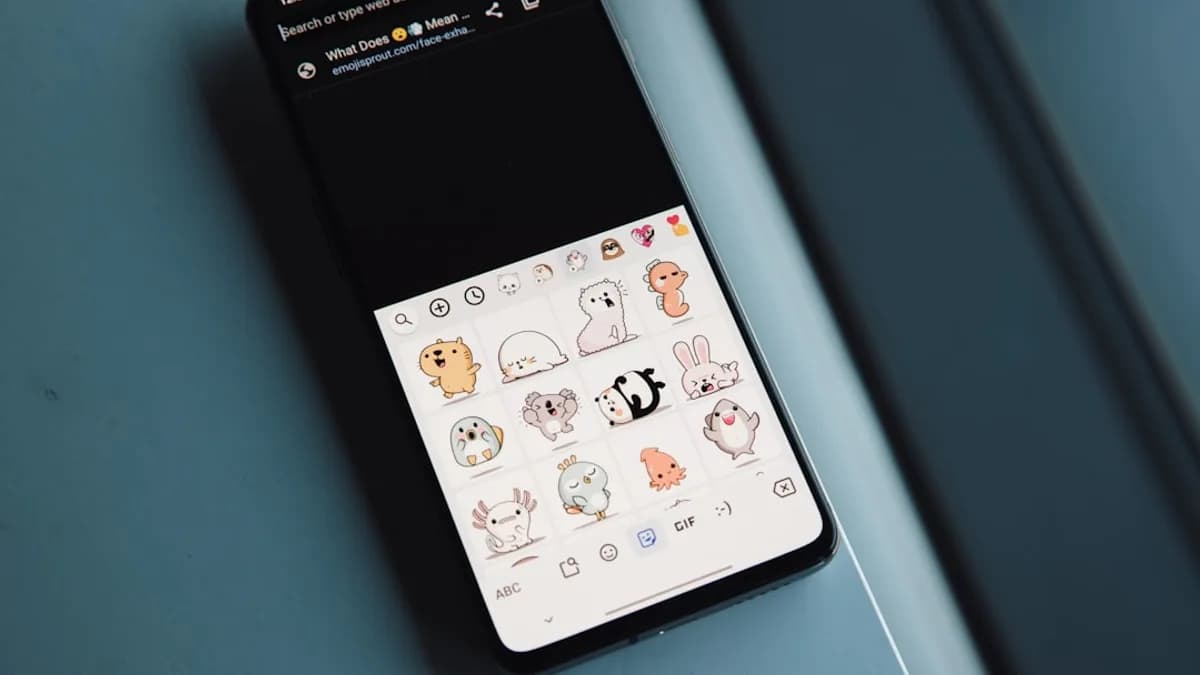
WhatsApp Plus subscribers gain access to a curated library of stickers unavailable to free users [Source: Source]. These range from animated emojis to branded packs, letting you inject more personality into your chats. Stickers have become a key engagement driver on messaging platforms worldwide—think of LINE’s sticker marketplace or Telegram’s custom packs. WhatsApp is clearly betting that exclusive digital flair will drive subscriptions.
Customization Options
Beyond stickers, Plus users may unlock additional chat themes, backgrounds, and color palettes. These allow you to personalize the look and feel of your conversations, moving beyond the standard green-and-white aesthetic WhatsApp is known for. Some reports suggest more expressive emojis, chat bubble styles, or even profile badge icons may be in the works [Source: Source]. While largely superficial, these features tap into the same psychological appeal that drives users to pay for custom skins in gaming or special themes on other platforms.
Cosmetic Enhancements
Early testers report other cosmetic tweaks—such as animated profile icons or priority access to new visual features—as part of the Plus bundle. This focus on appearance, rather than functional changes, makes WhatsApp Plus a clear parallel to recent paid offerings from Instagram and Telegram, which have also leaned heavily on cosmetic upgrades for their first consumer subscription tiers.
Experience Impact
While these features don’t make WhatsApp fundamentally different, they do create a more expressive, personalized environment for those willing to pay. For power users or those who see messaging as a key part of their social identity, these enhancements could be compelling. But for utilitarian users, the free version still covers all essential functions.
Managing Your WhatsApp Plus Subscription: Tips and Best Practices
Once you’ve subscribed, managing your WhatsApp Plus plan is straightforward but worth monitoring to avoid unexpected charges or lapses in service.
Checking Subscription Status and Renewal
You can view your current subscription status—active, expiring, or canceled—within the WhatsApp app’s subscription section. Here, you’ll see your renewal date, plan type, and payment method.
Canceling or Modifying Your Plan
To cancel, simply tap the “Manage Subscription” button in WhatsApp, which redirects you to your App Store or Google Play subscriptions page. There, you can cancel auto-renewal, switch plans, or update billing information. Your Plus features will remain active until the end of the current billing period.
Understanding Billing and Refunds
WhatsApp Plus uses the same billing cycles and refund policies as other in-app subscriptions. If you cancel mid-cycle, you won’t get a partial refund but will retain access until the next billing date. For billing issues or accidental charges, you’ll need to contact your app store provider—not WhatsApp directly.
Staying Updated
WhatsApp regularly updates its app to patch bugs and add features. To ensure uninterrupted access to Plus perks, keep your app updated. Enable automatic updates on your device, and check the WhatsApp blog or in-app notifications for announcements about new features or changes to Plus.
Analyzing the Value of WhatsApp Plus: Is It Worth the Cost?
With WhatsApp Plus, the company is testing whether users will pay for digital self-expression on a messaging platform that was historically free and utilitarian. How does it stack up?
Free vs. Plus
The free tier of WhatsApp remains robust: unlimited messaging, voice and video calls, group chats, and media sharing, all end-to-end encrypted. Plus, by contrast, is purely about aesthetics and personalization.
Cost vs. Benefits
For most users, the cosmetic upgrades may feel optional. But consider the precedent set by platforms like Telegram, which introduced Telegram Premium in 2022 with a mix of cosmetic and functional perks. Telegram reportedly attracted over a million paid users within months, indicating real demand for messaging app subscriptions—especially among younger, highly engaged demographics [Industry context].
WhatsApp Plus’s pricing—just a few dollars a month—positions it as an impulse buy rather than a major expense. If you love customizing your chat environment, sharing unique stickers, or simply want early access to new features, Plus might be worth it. For those who view WhatsApp as a utility, sticking to the free tier makes sense.
User Feedback and Early Reviews
Early feedback is mixed but constructive. Some testers appreciate the ability to personalize their chats, while others question the value of paying for “flash” rather than substance [Source: Source]. As with any new subscription, much depends on how quickly WhatsApp expands the feature set and responds to user suggestions.
Future Enhancements
WhatsApp is likely to iterate on Plus, experimenting with additional perks—perhaps early access to beta features, profile customization, or even integrations with business accounts. If future updates include meaningful productivity tools or privacy enhancements, the value proposition could shift dramatically, as we’ve seen with other tech platforms.
Conclusion: Making the Most of WhatsApp Plus Subscription
WhatsApp Plus signals a new chapter for the platform, offering paid personalization to users seeking more expressive, customized chats. If you’re eligible, subscribing is easy—just update your app, check availability, and manage your plan through familiar app store settings. For now, Plus is best suited to users who value digital self-expression and want to stand out in their daily conversations.
As WhatsApp refines this offering, the subscription could evolve to include more compelling features. Stay tuned for updates, and weigh whether these new perks align with how you use WhatsApp. In a messaging world increasingly defined by choice, having the option to upgrade—even just for fun—marks a subtle but significant shift in how we connect.