Unlock Massive Savings on the TCL QM8 Mini LED TV at Best Buy
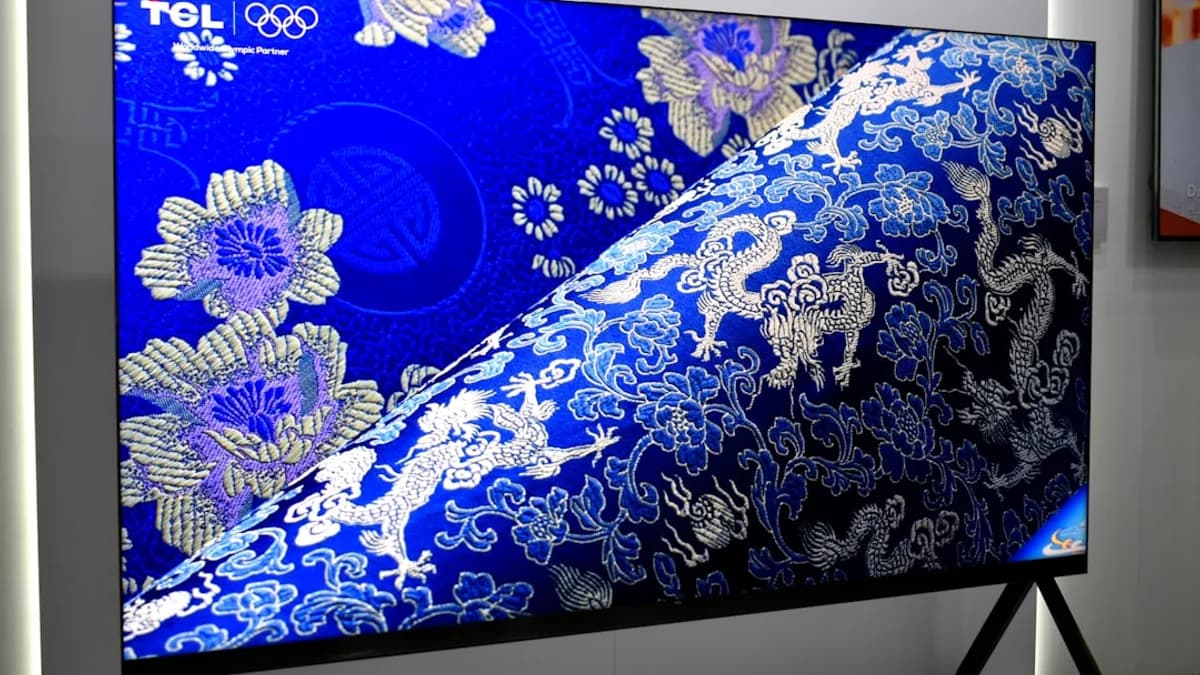
Best Buy just chopped up to $2,000 off the TCL QM8 Mini LED TV, making this high-end screen a steal for movie lovers and gamers. It’s rare to see a top-rated TV get such a deep price cut—especially one packed with the latest display tech. If you want a bright, colorful picture and booming sound without blowing your budget, this deal is tough to beat. For buyers who have been waiting for a big TV upgrade, this is one of the best times to act. According to ZDNet, TCL’s QM8 is already a crowd-pleaser, and this sale brings it into reach for many more homes.
TV prices usually drop around big events like the Super Bowl or Black Friday, but this discount is just as big—without the rush or crowds. With some models now selling for less than half their original price, you can grab a premium home theater experience for what you’d pay for a mid-range set a year ago.
Identify Your Needs to Confirm the TCL QM8 Mini LED TV Is Right for You
Before jumping at the deal, make sure the TCL QM8 suits your needs. This TV uses Mini LED technology, which means smaller, brighter lights behind the screen for deep blacks and rich colors. You’ll notice the difference when watching dark movies or bright sports. The QM8 also supports high refresh rates, so fast action looks smooth—great for gaming or action movies.
Sound is another strong point. Built-in speakers deliver clear voices and punchy bass, but there’s also support for Dolby Atmos if you want to add a soundbar. The TCL QM8 comes with Google TV built in, so you can stream Netflix, YouTube, and Disney+ right out of the box. It works with most smart home setups, too. If you have older devices or want to hook up a game console, there are plenty of HDMI ports.
Ask yourself: Do you want a big, bright picture for sports? Crisp detail for movies? Good sound without extra speakers? Easy streaming? If you’re nodding yes, the QM8 should be on your shortlist.
Prepare for Your Purchase: What to Check Before Buying the TCL QM8 at Best Buy
Don’t let excitement rush your buy. First, check if your local Best Buy has the TCL QM8 in stock and see how long the sale lasts. These big discounts sometimes run out fast—especially on popular sizes like 65 or 75 inches. Call ahead or use the Best Buy website to check.
Next, look at the different sizes and make sure you pick the right one for your room. The QM8 comes in several sizes, from 65 inches up to 98 inches. Double-check the model number—sometimes features or ports can change between sizes.
Finally, compare prices at other stores like Amazon, Walmart, or Costco. Sometimes, a price match or extra promo code can save you more. Read the fine print on Best Buy’s return policy in case you need to swap or return the TV. A little homework now can save a headache later.
Step-by-Step Guide to Buying the TCL QM8 Mini LED TV at Best Buy for Maximum Savings
Ready to score the deal? Here’s how to make sure you get the TCL QM8 at the best price:
1. Go to Best Buy’s Website or Store
Head to Best Buy’s website and search for “TCL QM8 Mini LED TV.” You’ll see all available sizes and current prices. If you’d rather see it in person, visit a local Best Buy and ask a staff member to show you the QM8.
2. Pick the Right Model and Size
Click through the size options and read the specs. Make sure the one you choose fits your space and has all the features you want. Double-check the model number—sometimes a small difference can mean fewer ports or a weaker speaker.
3. Check for Extra Savings and Promo Codes
Look for any “Deal of the Day” banners or promo codes on the product page. Best Buy often gives extra discounts to members of their My Best Buy program, or you might see offers like “save $100 on a soundbar with TV purchase.” Add these to your cart if you want.
4. Choose Financing or Payment Method
If you want to spread out payments, see if you qualify for Best Buy’s 12- or 24-month financing. Read the terms—interest charges can add up if you miss payments. You can also pay with credit card, PayPal, or gift cards.
5. Add to Cart and Start Checkout
Once you’re set, click “Add to Cart.” During checkout, review your order carefully. Make sure the discount is applied—compare the price to the original and the amount saved.
6. Select Delivery or Pickup
You can pick up the TV in store (often the fastest choice) or schedule home delivery. For big TVs, delivery may include setup or haul-away for your old set. Double-check delivery times—some sizes might be backordered.
7. Confirm and Save Your Receipt
Finish checkout and save your confirmation email. This will help if you need support or want to track your order.
Watch out for:
- Out-of-stock surprises—act fast on popular sizes.
- Add-on offers—only buy extras (like cables or warranties) if you really need them.
- Return deadlines—usually 15 days for most TVs, but longer for Totaltech members.
Set Up Your New TCL QM8 Mini LED TV for Optimal Picture and Sound Quality
Setting up your new TV is almost as fun as watching your first movie on it. Here’s how to do it right:
1. Unbox with Care
Lay the box flat and get help if the TV is large. Mini LED screens are tough, but the corners are still fragile. Use the included stand or wall mount—make sure it’s level.
2. Power Up and Follow On-Screen Prompts
Plug in the TV and use the remote to start setup. The QM8 will walk you through connecting to Wi-Fi and signing in to Google TV.
3. Calibrate Picture Settings
Go into the TV’s settings and look for “Picture Mode.” Try “Movie” or “Cinema” for the most accurate colors. Turn on “Local Dimming” to get those deep blacks Mini LED is known for. If you want to get really fancy, use a test video from YouTube to dial in brightness and sharpness. You don’t need a pro—just trust your eyes.
4. Tune the Audio
Pick a “Standard” or “Movie” sound mode for everyday use. If you connect a soundbar, switch the TV’s audio output to “eARC” for the best sound. The QM8 supports Dolby Atmos, which adds height and space to sound effects—great for action movies or sports.
5. Connect Your Streaming Services and Devices
Sign in to Netflix, Disney+, or any app you use. The Google TV system can pull all your favorites into one menu. Plug in game consoles, Blu-ray players, or speakers using the HDMI ports. Test everything to make sure it works.
6. Update Software
Check for a system update before you settle in. This keeps your TV running smoothly and fixes bugs.
Quick Recap: How to Save Big and Enjoy Your TCL QM8 Mini LED TV
To grab this deal: check stock at Best Buy, compare sizes and specs, score extra savings or financing, and finish your order fast—these discounts won’t last. The TCL QM8 Mini LED TV gives you rich colors, deep blacks, and smart features for a fraction of the usual price. Don’t wait too long—once the sale ends, prices will bounce back up. Set up your new TV, grab some popcorn, and enjoy the show.
Next action: Check Best Buy now and see if your dream TV is still on sale.
Why It Matters
- Shoppers can access high-end TV technology at a fraction of the usual price.
- The deep discount makes premium home theater features affordable for more households.
- Unprecedented price cuts outside of major sales events provide unique upgrade opportunities.