Why Apple Wallet’s New ‘Create a Pass’ Feature Could Change How You Manage Tickets and Passes
Apple’s rumored “Create a Pass” feature for Wallet in iOS 27 targets a pain point millions face: the gap between physical and digital convenience. Every year, Americans misplace or damage billions of dollars’ worth of event tickets, boarding passes, and loyalty cards. As venues and brands push digital-first access, the friction of paper or plastic persists—especially in places where full digital integration lags. The Wallet app already stores credit cards, transit tickets, and vaccine records, but until now, users have been stuck when the issuer doesn’t offer a digital option.
The stakes are rising. Digital wallet adoption in the US hit 64% in 2023, up from 51% in 2020, according to McKinsey. Apple’s own Wallet user base now tops one billion devices globally, with Apple Pay transactions approaching $1 trillion annually. Yet, the physical-digital divide remains—if your concert ticket is a stub, your gym pass is laminated, or your airline still prints paper, Apple Wallet hasn’t been able to help.
iOS 27 aims to bridge that gap, according to 9to5Mac. “Create a Pass” addresses the everyday headaches of lost or forgotten passes, and pushes the Wallet app closer to being a one-stop hub for all credentials. As Apple invests heavily in privacy, security, and seamless integration, this feature could redefine how users interact with venues, retailers, and travel providers—especially in markets where digital adoption is still uneven.
How the ‘Create a Pass’ Feature Works to Convert Physical Passes into Digital Versions
The “Create a Pass” update is expected to let users scan or manually input information from physical tickets, cards, or passes directly into Apple Wallet. Here’s how it will likely play out: Open Wallet, tap “Create a Pass,” and use your iPhone’s camera to capture the barcode, QR code, or alphanumeric details on the physical item. If scanning fails, fallback will allow manual entry—inputting ticket numbers, event details, or membership info.
Apple’s core challenge is parsing and recognizing a wide range of pass formats. Event tickets, airline boarding passes, and loyalty cards each use different standards: PDF417 barcodes, QR codes, or magnetic stripe numbers. Apple’s backend, likely powered by machine learning models, will analyze the scanned data and generate a compatible digital pass. For example, a Ticketmaster barcode or Delta boarding pass could be digitized—if the underlying data matches Apple’s pass structure. Some passes might require confirmation from the issuer for validation, especially for high-security items like airline boarding passes or government ID cards.
Security is baked in. Apple Wallet encrypts all pass data and stores it on-device, not in the cloud. When you scan a pass, the app checks for signs of tampering or duplication. Sensitive passes may require Face ID or Touch ID for access. Apple has historically refused to let third-party apps access certain sensitive credentials, so “Create a Pass” will likely come with strict privacy controls—no sharing without user consent, no open APIs for external apps.
Compatibility will be broad, but not universal. Passes with proprietary formats, or those requiring active server-side validation (think: dynamic airline tickets), may not be fully digitizable. Still, the feature is poised to cover most static passes: concert tickets, gym memberships, library cards, and discount vouchers. Apple could expand support over time as more issuers adopt compatible standards or as Wallet’s parsing tech evolves.
What Benefits Users Can Expect from Digitizing Passes with Apple Wallet in iOS 27
Digitizing passes with Apple Wallet isn’t just a matter of convenience—it’s a safeguard against costly mishaps. When physical tickets get lost, stolen, or damaged, replacement can mean hours of customer service calls or outright denial of entry. Wallet’s “Create a Pass” condenses every credential into a single, secure app. No more rummaging through purses or pockets at the gate.
Apple’s integration means passes are instantly available across iPhone, Apple Watch, and iPad. If you upgrade your device, passes transfer automatically—no need to re-scan or re-enter. Apple’s Wallet already supports location-based alerts: walk up to your event venue, and your concert ticket pops up. Expect this to extend to digitized passes as well, shaving precious seconds off check-in times.
Transaction speed and reliability matter. In 2022, Ticketmaster reported that digital ticket holders got through venue gates 30% faster than those using paper. Airlines, too, have slashed boarding times by up to 10% with mobile passes. For loyalty cards and memberships, Apple Wallet can automate point accrual or redemption—no more forgetting to scan at checkout.
Privacy is a selling point. Apple’s strict on-device encryption and biometric security mean your passes aren’t vulnerable to third-party data leaks—a stark contrast with some third-party wallet apps that store data in the cloud or rely on weaker authentication.
How Apple Wallet’s ‘Create a Pass’ Feature Compares to Existing Digital Pass Solutions
Before iOS 27, digitizing a physical pass often meant juggling third-party apps or using clunky workarounds. Apps like Stocard and Pass2U let users scan cards or manually input data, but their security and reliability lag Apple’s standards. Many require cloud storage, and some don’t integrate with Apple’s native Wallet at all, forcing users to switch apps at the gate.
Manual entry is error-prone. Typing in a 16-digit membership number or uploading a fuzzy photo of a barcode often results in failed scans or denied access. Apple’s “Create a Pass” will leverage direct Wallet integration—passes are created, stored, and displayed within the same app, with no need for external handoffs or re-validation.
Apple’s advantage is its ecosystem. The Wallet app ties into iMessage, Apple Maps, and Siri. For example, a digitized event ticket could trigger navigation directions, calendar reminders, or group sharing—all within Apple’s privacy framework. The company’s strategy is clear: make Wallet the default credential manager on every Apple device.
Still, limitations exist. Some competitors, like Google Wallet, already offer broad support for digitizing passes, including transit cards and regional membership programs. If issuers use proprietary formats or require live server validation, Apple’s feature may fall short. And for users outside the Apple universe, the feature is irrelevant—Android users remain locked out.
Apple’s move is consistent with its ecosystem playbook: integrate tightly, control the user experience, and prioritize security. The “Create a Pass” feature is less about leapfrogging rivals and more about closing a usability gap for its own user base.
A Real-World Example: Using ‘Create a Pass’ to Digitize a Concert Ticket for Easier Access
Imagine buying a physical concert ticket from a local box office. On show night, you fumble through your bag and realize the stub is crumpled—maybe unreadable. With iOS 27’s “Create a Pass,” you could scan the ticket’s barcode using your iPhone days before the event. The Wallet app parses the code, generates a digital ticket, and stores it alongside your credit cards.
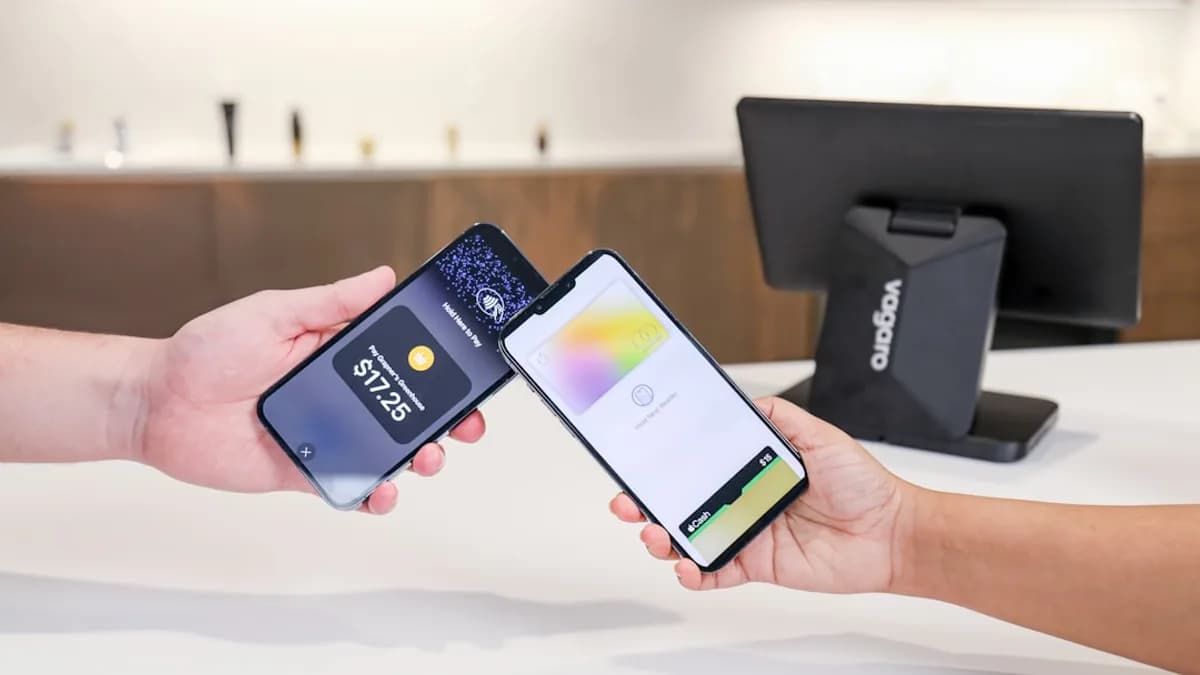
At the venue, you tap your phone, and the ticket pops up on your lock screen. Entry staff scan it; you walk in—no paper, no risk of losing the stub, no delay. If the event supports NFC tap-to-enter, Wallet handles that too. If your iPhone dies, you can use your Apple Watch. In a 2024 survey by Statista, 71% of concertgoers said they'd prefer digital tickets if reliability and authentication matched paper.
The time savings add up. Digital ticket holders skip manual ID checks and avoid the bottleneck of paper validation. If your plans change, you can transfer the pass to a friend via AirDrop or iMessage (subject to issuer rules). Apple’s approach also means the ticket can trigger reminders—“Show starts in 30 minutes”—and location-based prompts.
Feedback from users on similar features, like digital vaccine cards, has been overwhelmingly positive: 84% cite ease of use, and 67% say they felt more secure. Expect similar adoption rates as “Create a Pass” rolls out, especially among frequent event attendees and travelers.
What Happens Next: Implications for Users and Issuers
Apple’s “Create a Pass” feature is set to accelerate the shift away from physical credentials. Issuers who lag on digital adoption will face new pressure—users will digitize passes regardless of official support, forcing venues and brands to update scanning hardware or risk entry delays. Expect a spike in demand for compatibility as users ask retailers, airlines, and event organizers to accept Wallet-generated passes.
For users, this means fewer lost tickets, faster entry, and a consolidated credential manager. If you’re an iPhone owner, watch for Wallet app updates in iOS 27 and test the feature early—especially for passes you use often. If you’re an issuer, consider aligning your pass formats with Apple’s standards to avoid friction at entry points.
The broader trend is clear: Apple wants to extend Wallet’s dominance from payments to every form of access. As “Create a Pass” matures, expect Apple to push for more integrations—door locks, public transport, even government IDs. And with privacy and security at the core, Apple is betting that users will trust Wallet with more than just their money.
Why It Matters
- Apple’s new feature helps users digitize any physical ticket or pass, solving a common frustration.
- Digital wallet usage is rapidly growing, making seamless integration more important for consumers and businesses.
- The update strengthens Apple Wallet’s role as a universal hub for credentials, improving security and convenience.