MLXIO
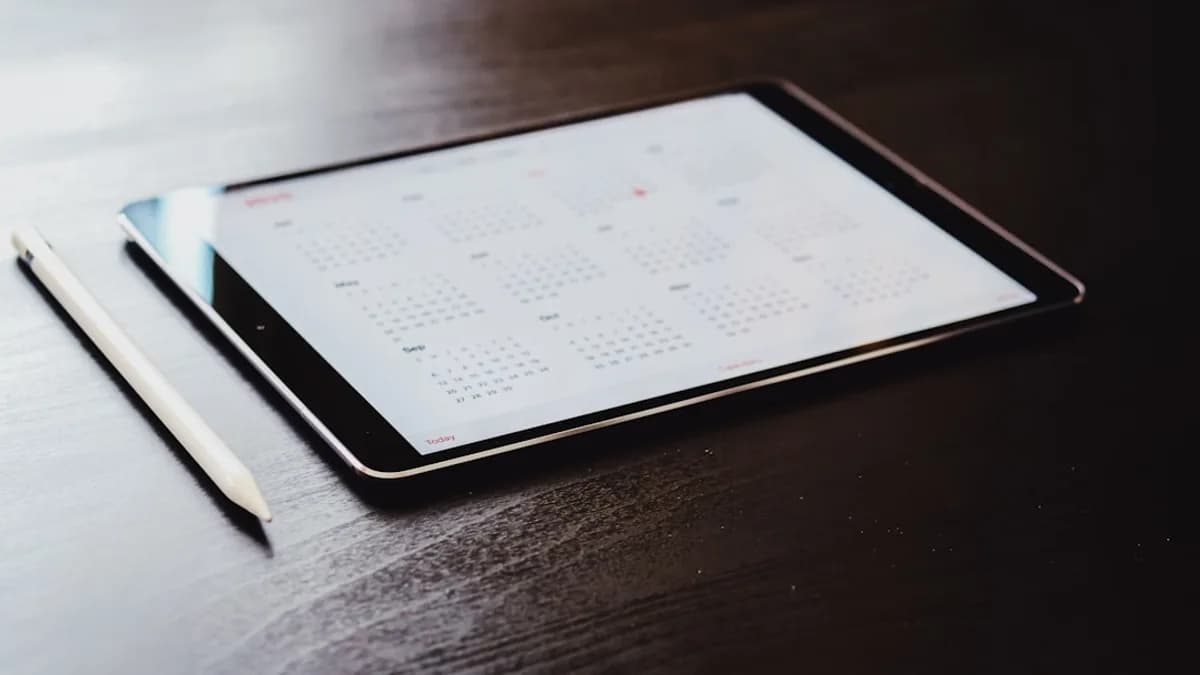
white ipad on brown wooden table
TechnologyMay 15, 2026· 4 min read· By Dev Kapoor

Apple Calendar Crushes To-Do Lists for Real Productivity

Share

MLXIO Intelligence

Analysis Snapshot

71
High
Confidence: MediumTrend: 10Freshness: 97Source Trust: 100Factual Grounding: 88Signal Cluster: 20

High MLXIO Impact based on trend velocity, freshness, source trust, and factual grounding.

Thesis

High Confidence

Using Apple Calendar as a task manager enforces time-based planning and commitment, making it more effective for productivity than traditional to-do lists.

Evidence

  • Apple Calendar requires each task to be scheduled as an event, revealing real bandwidth and preventing overcommitment.
  • Calendar-based task management provides visual, time-bound closure and a stronger sense of accomplishment compared to checking off list items.
  • Apple Calendar integrates seamlessly across Apple devices, supporting easy scheduling and reminders within the user's workflow.
  • Traditional to-do lists lack mechanisms to account for time, leading to ballooning tasks, blurred priorities, and frequent overload.

Uncertainty

  • The analysis is based on personal experience and anecdotal evidence rather than broad empirical studies.
  • User preferences and productivity needs may vary, so the calendar approach may not suit everyone.
  • Potential limitations or drawbacks of calendar-based task management are not deeply explored.

What To Watch

  • User adoption rates of calendar-based task management versus traditional to-do lists.
  • Feedback or studies comparing productivity outcomes between calendar and list-based task management.
  • Integration improvements or new features in Apple Calendar that further enhance task management.

Verified Claims

Using Apple Calendar as a task manager enforces realistic scheduling by assigning each task a specific time slot.
📎 The article states that every task must occupy a real slot on your schedule, revealing bandwidth limitations immediately.High
Apple Calendar integrates seamlessly across Apple devices, allowing easy scheduling and adjustment of tasks.
📎 The article notes that Apple Calendar syncs across Mac, iPhone, and iPad, making task management convenient.High
Treating tasks as calendar events rather than checklist items increases commitment and reduces procrastination.
📎 The article explains that assigning a time makes a task a real commitment, and scheduled tasks become fixed appointments.High
Traditional to-do lists lack time constraints, often leading to overcommitment and an ever-growing backlog.
📎 The article points out that to-do lists balloon without built-in time mechanisms, resulting in overload and vague goals.High
Using a calendar for task management provides a clearer sense of accomplishment than checking off items on a list.
📎 The article describes how completing a scheduled task and seeing the calendar clear out delivers sharper closure.Medium

Frequently Asked

How does Apple Calendar improve productivity compared to traditional to-do lists?

Apple Calendar improves productivity by requiring tasks to be scheduled as events, which enforces realistic planning and prevents overcommitment.

Can Apple Calendar be used across multiple Apple devices?

Yes, Apple Calendar syncs seamlessly across Mac, iPhone, and iPad, allowing users to manage tasks from any device.

What psychological benefits come from scheduling tasks as calendar events?

Scheduling tasks as calendar events increases commitment, reduces procrastination, and provides a clearer sense of accomplishment when tasks are completed.

Why do traditional to-do lists often lead to overload and anxiety?

Traditional to-do lists lack time constraints, causing tasks to pile up and priorities to blur, which can result in overload and anxiety.

How can someone start using Apple Calendar for task management?

Someone can start by converting their to-do list into scheduled calendar events, assigning each task a specific time slot to create a more actionable plan.

Updated on May 15, 2026

Why Relying on Apple Calendar Beats Traditional To-Do Lists for Task Management

Almost everyone swears by to-do lists—on paper, in slick apps, or both. But after decades of personal trial and error, I’ve found a calendar trumps any checklist for actually getting things done. The reason is simple: a calendar turns intention into obligation. When each task becomes an event with a start and end time, vague ambitions finally meet the reality of your day. That’s why, despite the near-universal adoption of to-do lists, I use Apple Calendar as my primary task manager—and I’m convinced more people should consider the same approach, as outlined in 9to5Mac.

How Apple Calendar Enhances Productivity Through Time-Based Task Planning

Traditional to-do lists operate in a vacuum. You jot down what needs doing, but there’s no friction—no limit on how much you can assign yourself. Apple Calendar flips that dynamic. Every task, big or small, must occupy a real slot on your schedule. This enforces a kind of honesty. If you try to cram 12 things into an already packed Thursday, the problem reveals itself immediately. You see your bandwidth, not just your ambition.

The benefits compound if you’re already embedded in the Apple ecosystem. Apple Calendar syncs seamlessly across devices, making it easy to schedule or adjust tasks from your Mac, iPhone, or iPad. Reminders and alerts keep you from drifting off track, and integration with other native tools means you’re not fighting your workflow to stay on course. In effect, planning becomes less about writing things down and more about designing your day—or week—with the same tools you use to manage meetings, calls, or appointments.

What’s clear from the source is that this approach isn’t about complexity or feature creep. It’s about leveraging the simplicity and ubiquity of a tool most people already use—and transforming it into a smarter system for daily execution.

The Psychological Advantage of Seeing Tasks as Events Rather Than Checkboxes

There’s a subtle but powerful shift when you treat every task as a scheduled event rather than just a line on a list. Assigning a time makes it a real commitment, not just a wish. The act of blocking off an hour for “review quarterly report” feels weightier—and less escapable—than jotting “review report” on a list.

The psychological payoff also changes. Completing a scheduled task and seeing your calendar clear out delivers a sharper sense of accomplishment than ticking a box. It’s a visual, time-bound closure that reinforces progress. This structure also attacks procrastination. Instead of tasks lingering as open loops, they become fixed appointments—forcing a decision: do it now, or reschedule with intent.

Addressing the Limitations of To-Do Lists: Why They Often Fall Short

To-do lists are popular for a reason: they’re easy to use, easy to start, and satisfying to add to. But that simplicity is a double-edged sword. With no built-in mechanism to account for time, lists balloon. Tasks pile up, priorities blur, and deadlines—if they exist—are often arbitrary. The result? Overload, anxiety, and the nagging sense that you’re always behind, even if you’re constantly busy.

9to5Mac makes the point that this isn’t just a theoretical problem. In practice, traditional lists encourage overcommitment and vague goals. You end up with an ever-growing backlog rather than a realistic, actionable plan. The calendar method addresses this, forcing you to be selective and deliberate about what actually fits into your day.

Encouraging Readers to Experiment with Apple Calendar for Smarter Task Management

If you’re drowning in tasks or feeling like your lists never get shorter, it’s time to try a different approach. Start by turning your next to-do list into a calendar: assign each task a slot, see what fits, and let the rest wait. Use native Apple Calendar tools to set reminders and keep your plan visible across devices. The payoff isn’t just a tidier schedule—it’s a sharper sense of control and progress.

The to-do list isn’t dead. But if you want to stop spinning your wheels, make your calendar your command center. You’ll be forced to prioritize, to reckon with the limits of your time, and—most crucially—to actually finish what you start. That’s a shift worth making.

Key Takeaways

  • Using a calendar enforces realistic scheduling and prevents overcommitting.
  • Apple Calendar integrates with existing tools, streamlining task management for users in the Apple ecosystem.
  • Shifting from to-do lists to calendar-based planning can improve task completion and time management.

Apple Calendar vs. Traditional To-Do Lists for Task Management

FeatureApple CalendarTraditional To-Do List
Task SchedulingTasks assigned specific time slotsTasks listed without time constraints
IntegrationSeamlessly syncs across Apple devicesMay require separate apps or manual updates
AccountabilityTime-based obligation enforces realismEasy to overcommit without time limits
DK

Written by

Dev Kapoor

Consumer Tech & Gadgets Reviewer

Dev reviews smartphones, laptops, wearables, smart home devices, and consumer electronics. He focuses on real-world performance, value-for-money analysis, and helping readers find the best tech for their needs and budget.

SmartphonesLaptopsWearablesSmart HomeConsumer Electronics

Related Articles

a close up of an apple laptop computer
TechnologyMay 15, 2026

Apple Slashes 2TB M5 Pro MacBook Pro to All-Time Low

Apple drops the 2TB M5 Pro MacBook Pro to its lowest price ever, signaling a shift in premium laptop pricing and market strategy.

8 min read

shallow focus photo of Apple AirPods
TechnologyMay 15, 2026

Apple Card Promo Snags You Free AirPods Pro 3 Instantly

Apple’s Apple Card promo gives new users free AirPods Pro 3, marking a bold move to attract high-spending customers with premium rewards.

4 min read

Black smartphone placed on a black laptop.
TechnologyMay 14, 2026

iPhone 17 Pro Crushes 32 Phones with Fastest Charging Speed

The iPhone 17 Pro tops 33 phones tested for fastest charging by optimizing real-world wired and wireless efficiency, not just wattage specs.

6 min read

apple logo on blue surface
TechnologyMay 14, 2026

Apple’s Liquid Glass Design Wins Top Award for iOS 26

Apple’s Liquid Glass design for iOS 26 clinched a top industry award, highlighting its role as a key innovation in user experience.

4 min read

Apple Sparks Enterprise Shift With macOS 26.5 Fixes
TechnologyMay 14, 2026

Apple Sparks Enterprise Shift With macOS 26.5 Fixes

Apple highlights key enterprise fixes in macOS 26.5, marking a strategic push to address IT concerns and boost managed Mac stability.

4 min read

assorted-color clothes lot
AI / MLMay 13, 2026

Apple Bets on AI Agents to Shake Up the App Store

Apple is set to integrate AI agents into the App Store, potentially transforming app discovery and developer dynamics ahead of WWDC.

4 min read

slightly opened silver MacBook
CybersecurityMay 14, 2026

Anthropic’s Mythos AI Sparks Urgent macOS Security Hunt

Anthropic’s Mythos AI exposed new macOS vulnerabilities, pushing Apple into an urgent, unprecedented security investigation.

6 min read

turned on LED projector on table
TechnologyMay 15, 2026

AWOL Vision Sparks Frenzy with €1,400 Off 4K Laser UST Projectors

AWOL Vision’s new 4K laser UST projectors offer up to €1,400 off in pre-orders, shaking up the premium home cinema market with aggressive early discounts.

4 min read

a cell phone on a table
TechnologyMay 15, 2026

Realme Sparks Finnish Comeback as OnePlus Exits Europe

Realme returns to Finland on May 18 with three devices, aiming to seize market share as OnePlus retreats from Europe.

4 min read

person holding space gray iPhone 5s taking picture
TechnologyMay 15, 2026

Sony’s Xperia 1 VIII AI Camera Sparks Viral Meme Roast

Sony’s Xperia 1 VIII AI Camera backfires, spawning viral memes that mock its overexposed, amateurish edits and highlight AI hype risks.

4 min read

Stay ahead of the curve

Get a weekly digest of the most important tech, AI, and finance news — curated by AI, reviewed by humans.

No spam. Unsubscribe anytime.