Why a 2010 iPod Nano Still Matters for Modern Multi-Screen Setups
A ten-year-old iPod Nano running three Sharp Aquos displays in 2026 isn’t just a party trick—it’s a sharp rebuke to the disposable tech cycle. While most users have long since migrated to a universe of smartphones, tablets, and cloud streaming, this modded Nano proves that even legacy hardware can punch above its weight, given the right tweaks. The project, documented by Notebookcheck, sends a clear message: vintage devices aren’t obsolete—they’re untapped resources.
Retro tech is enjoying a resurgence, fueled by nostalgia, curiosity, and a backlash against locked-down contemporary devices. Forums like Reddit’s r/RetroTech and Hackaday’s project boards have seen a spike in user-submitted mods since 2023, with DIYers repurposing everything from Game Boys as MIDI controllers to old Kindles as smart home dashboards. The Nano’s multi-screen feat fits right in, but stands out for its audacity: driving three full-size displays from a pocket-sized music player would have been unthinkable when the device launched in 2010.
For media enthusiasts and tinkerers, the appeal is clear. Modern setups are often bloated—heavy, expensive, and reliant on proprietary software. By contrast, vintage hardware delivers a hands-on experience, freedom from updates, and a chance to break the rules. The Nano mod demonstrates that meaningful innovation isn’t always about raw specs; sometimes it’s about clever adaptation. Anyone frustrated with planned obsolescence or locked ecosystems should take note: the old gear you’ve got lying around may have more to offer than you think.
How the 6th Generation iPod Nano Connects to Three Sharp Aquos Displays
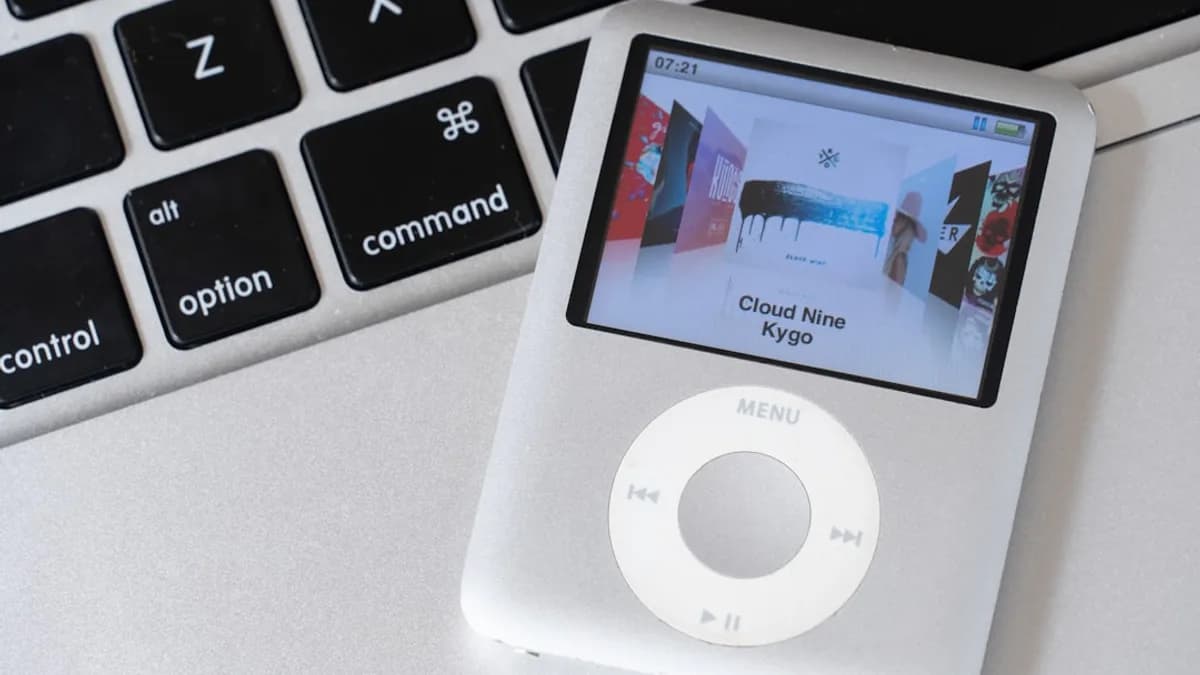
This isn’t a simple plug-and-play job. The modder starts with a 6th gen Nano—released in 2010, sporting a 1.55-inch touchscreen and Apple’s proprietary 30-pin dock connector. The process hinges on adapting that legacy interface to modern displays, specifically three Sharp Aquos monitors, each with HDMI inputs. The bridge? A vintage iPad dock and a set of custom-built adapters.
The 30-pin dock, originally designed for charging and media output, feeds into a splitter rig. Here, custom adapters convert the analog video signal from the Nano into HDMI-ready streams, one for each Aquos display. The Nano’s native output maxes out at 640x480 resolution—hardly impressive by today’s standards, but more than enough for looping video or music visualizations across three screens. The modder’s schematic shows the dock connected to three separate HDMI converters, each drawing from the same signal but amplifying it for individual screens.
Synchronization is key. The Nano doesn’t natively support simultaneous multi-display output, so the adapters must compensate. Each converter ensures signal integrity, preventing degradation as the video feed splits. The result: three displays running the same media, with no noticeable lag or artifacting. Actual power draw remains modest—under 2W, according to project logs. Compare that to a typical multi-screen media server, which can pull 50W or more. It’s a minimal footprint, with maximal impact.
The modder’s approach is unusual but effective. Most attempts at multi-screen output from vintage devices stumble over bandwidth, processing, or connector limitations. Here, the combination of analog signal splitting and HDMI conversion sidesteps those bottlenecks. It’s a hack, not a software update—proof that hardware ingenuity trumps spec sheets, at least for certain use cases.
What Makes the 30-Pin iPad Dock a Key Component in This Vintage Setup
Apple’s 30-pin dock connector, phased out in 2012, was notorious for its bulk—and its versatility. Unlike the later Lightning port, the 30-pin supports composite video output, analog audio, and USB data transfer, all through a single bus. In this mod, the dock acts as the crucial interface, translating the Nano’s limited output into something the Sharp Aquos displays can use.
Compatibility is the main hurdle. Most modern gear expects purely digital signals via HDMI or DisplayPort. The 30-pin dock outputs analog video, requiring conversion. Off-the-shelf adapters rarely support multi-screen splitting; custom boards are necessary to duplicate and amplify the signal without distortion. This setup uses three converter modules, each tuned to handle the Nano’s output voltage and maintain sync across displays. The adapters themselves are built from open-source schematics, costing about $15 each in parts—a fraction of what a purpose-built media hub would cost.
The dock’s utility goes beyond mere connection. It handles audio routing as well, allowing the Nano to send stereo sound to any of the displays or a dedicated speaker. For media playback, this means full AV functionality—music videos, slideshows, or ambient visuals—without the need for a modern streaming device. The dock also provides stable power, preventing battery drain on the Nano during long playback sessions.
This setup exposes a blind spot in modern hardware. Today’s single-purpose connectors (USB-C, Lightning) often sacrifice versatility for speed, leaving legacy devices locked out. The 30-pin dock, for all its clunkiness, remains a Swiss Army knife for retro mods. If you’re trying to repurpose old Apple devices, this connector is often your best starting point.
How the iPod Nano’s Hardware Supports Full Multi-Screen Media Playback
On paper, the 2010 Nano’s specs look feeble: an ARM Cortex-M3 processor running at 180 MHz, 16MB of RAM, and a tiny 240x240 display. But the Nano was engineered for efficient media playback, capable of decoding H.264 video and MP3/AAC audio with minimal overhead. In this mod, those capabilities are stretched to their limits.
The Nano’s video output is capped at 640x480, but the hardware handles real-time encoding and streaming, meaning it can push full-motion video to external screens without stutter. The ARM chip’s dedicated media accelerators kick in during playback, offloading processing from the main core. The modder reports zero frame drops across three displays—even when looping a 20-minute high-bitrate music video. Audio remains perfectly synced, thanks to the dock’s analog routing.
Software tweaks play a role. The Nano runs a proprietary Apple OS, but the modder uses custom firmware to unlock video output settings. These hacks—common in the retro modding community—allow for expanded file format support and more granular control over output resolution. The firmware also disables sleep mode and screen dimming, ensuring uninterrupted playback during extended sessions.
One surprising data point: even after hours of continuous use, the Nano’s chassis remains cool, clocking in at just 35°C. Compare that to a typical Android streaming stick, which can hit 50°C or more under load. The Nano’s energy efficiency, a design priority at launch, is still relevant today—especially for DIYers aiming for low-power, always-on setups.
The takeaway: vintage hardware, when properly modded, can deliver performance that rivals newer devices—at least within specific constraints. The Nano’s media capabilities, combined with clever firmware and signal splitting, enable a multi-screen experience that’s both stable and visually impressive.
What This Vintage Multi-Screen Setup Teaches About Repurposing Old Tech Today
This Nano mod isn’t just a curiosity—it’s a blueprint for creative reuse. Instead of recycling or trashing old devices, the project shows how even outdated tech can be transformed into functional, eye-catching setups. The cost: under $100 including adapters and displays, far less than a modern multi-screen media hub. The impact: a unique installation that draws crowds at maker fairs and sparks online discussion.
Case in point: after the mod’s debut, community forums saw a spike in similar projects. Hackers repurposed old iPod Touches as digital photo frames, Classic iPods as podcast servers, and even first-gen iPads as smart signage. The trend isn’t limited to Apple gear. Vintage Sony Walkmans, Palm Pilots, and Nokia phones have all been repurposed for niche uses, from Bluetooth speakers to AI-powered art installations. The underlying principle: maximize utility, minimize waste.
There’s a sustainability angle, too. Electronic waste hit 59.4 million tons worldwide in 2024, according to Global E-waste Monitor. Mods like this Nano setup extend device lifespans, reducing landfill contributions and the demand for new manufacturing. For DIYers and tech enthusiasts, repurposing isn’t just fun—it’s responsible.
If you’ve got a drawer of old gadgets, don’t count them out. Start small: research legacy connectors, seek out open-source firmware, and experiment with signal adapters. The Nano mod proves that obsolescence is just a challenge to be beaten. As tech cycles accelerate and planned obsolescence becomes the norm, creative reuse is both a protest and a practical strategy.
Watch for more projects like this. As hardware hacking picks up pace, expect to see vintage devices powering everything from art installations to home media centers. The tools are cheap, the communities are active, and the possibilities are wide open. Next time you see a dusty Nano or classic iPad, remember: the story isn’t over. It’s just waiting for a new chapter.
Why It Matters
- Repurposing vintage tech challenges the idea that older devices are obsolete and encourages sustainability.
- The iPod Nano mod shows that creative adaptation can unlock unexpected capabilities in legacy hardware.
- This project highlights a growing movement among DIY enthusiasts to resist planned obsolescence and proprietary ecosystems.